> ## Documentation Index
> Fetch the complete documentation index at: https://cadenya.com/docs/llms.txt
> Use this file to discover all available pages before exploring further.
# Handling webhooks
> How Cadenya signs and delivers objective event webhooks, and how to verify them with the SDK or by hand.
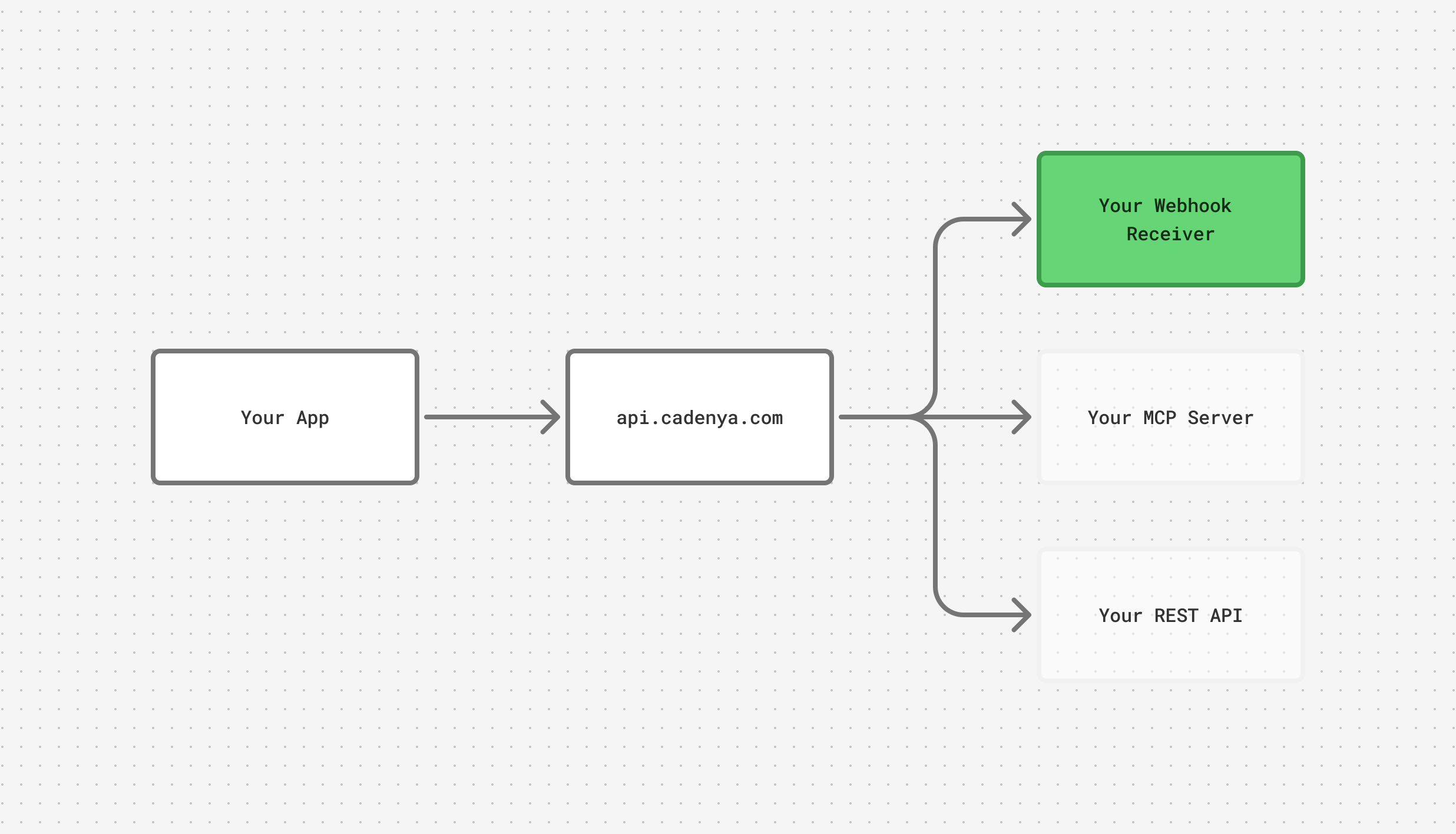
Cadenya sends you webhooks for all types of events that happen during an agent's objective. Tool calls, messages, and approvals all go to the configured webhook URL on your agent. This makes it possible to steer agents as they need guidance during an objective, like for a tool approval.
For example, if a tool approval is requested, you may want to send a message to Slack, an email to a customer, or a push notification to a device. The notification lets your end users know they need to hop in and weigh in on an action your AI agent wants to take.
At a high level, this is the architecture of a simple app with Cadenya.
 Building in TypeScript, Go, or Ruby? The Cadenya SDK verifies the signature and parses the payload for you with `webhooks.unwrap`. The [Approving a tool](/docs/guides/callbacks/approving-a-tool) and [Email updates from an objective](/docs/guides/callbacks/streaming-objective-events) guides build the full handler. The HMAC steps below show the mechanism by hand, for a language without an SDK helper or when you want to see what `unwrap` does under the hood.
## Recommended tools
Two tools pair well with agent webhooks: Svix Play as a destination, and the Standard Webhooks verifier, while you build against Cadenya.
* [Svix Play](https://play.svix.com/)
* [Standard Webhooks Verifier](https://www.standardwebhooks.com/verify)
## Webhooks
Webhooks sent by Cadenya conform to [Standard Webhooks](https://www.standardwebhooks.com/). They are delivered as POST requests with a JSON envelope containing `type`, `timestamp`, and `data` (with flat `agent`, `agentVariation`, `objective`, and `objectiveEvent` keys). Signed via Standard Webhooks HMAC-SHA256 (`webhook-id`, `webhook-timestamp`, `webhook-signature` headers).
| Type | Description |
| ------------------------------------------ | -------------------------------------------------------------------------------------------------------------------------------------------------------------------------------------------------------------- |
| `objective_event.user_message` | Triggered when a user message event occurs in an objective. |
| `objective_event.assistant_message` | Triggered when an assistant message event occurs in an objective. |
| `objective_event.tool_called` | Triggered when a tool call is executed in an objective. |
| `objective_event.tool_result` | Triggered when a tool result event occurs in an objective. |
| `objective_event.tool_error` | Triggered when a tool call encounters an error during execution. |
| `objective_event.tool_approval_requested` | Triggered when a tool call requires approval (respond via [Approve a tool call](/docs/api-reference/objectiveservice/approve-a-tool-call) or [Deny a tool call](/docs/api-reference/objectiveservice/deny-a-tool-call)). |
| `objective_event.tool_approved` | Triggered when a tool call is approved via [Approve a tool call](/docs/api-reference/objectiveservice/approve-a-tool-call). |
| `objective_event.tool_denied` | Triggered when a tool call is denied via [Deny a tool call](/docs/api-reference/objectiveservice/deny-a-tool-call). |
| `objective_event.sub_agent_spawned` | Triggered when a sub-agent is spawned as a child objective from a parent. |
| `objective_event.sub_agent_updated` | Triggered when a spawned sub-agent's child objective makes progress. |
| `objective_event.context_window_compacted` | Triggered when the objective compacts its context window. |
| `objective_event.memory_read` | Defined, but never delivered. A `get_memory` call arrives as `objective_event.tool_called`. |
| `objective_event.finalized` | Triggered when the objective finishes. Carries the structured output when the agent has an output schema. |
| `objective_event.cancelled` | Triggered when the objective is cancelled. |
| `objective_event.timed_out` | Triggered when the objective hits its inactivity timeout. |
| `objective_event.notice` | Triggered for informational notices during the run. |
| `objective_event.error` | Meant to fire when an objective fails, but not emitted today. A failed objective sends no event, so detect failure by polling the objective's `state`. |
## Handling a webhook
Cadenya webhooks contain `metadata` keys with the information about the event. For example, an `objective_event.assistant_message` looks like this:
```json theme={null}
{
"timestamp": "2026-05-04T12:51:57Z",
"type": "objective_event.assistant_message",
"data": {
"agent": {
"id": "agent_01KQSGJRXYYR2W2Y34XXGPTQS9",
"accountId": "account_01KQSF7M1S6S49WK2GSSYFRSHY",
"workspaceId": "workspace_01KQSF7NQX9BMWKEFY06VDTDP4",
"name": "Urgent Car Insurance Agent",
"createdAt": "2026-05-04T12:49:32.094034Z"
},
"agentVariation": {
"id": "agentvar_01KQSGJRZ8Y40AFHK0JE0YAD45",
"accountId": "account_01KQSF7M1S6S49WK2GSSYFRSHY",
"workspaceId": "workspace_01KQSF7NQX9BMWKEFY06VDTDP4",
"name": "Default",
"createdAt": "2026-05-04T12:49:32.136648Z"
},
"objective": {
"id": "obj_01KQSGKYGKPXBNJMCRRETCP63X",
"accountId": "account_01KQSF7M1S6S49WK2GSSYFRSHY",
"workspaceId": "workspace_01KQSF7NQX9BMWKEFY06VDTDP4",
"createdAt": "2026-05-04T12:50:10.579393Z",
"profileId": "profile_01KQSF7NJ4KD83P8AEH69NXNFM"
},
"objectiveEvent": {
"metadata": {
"id": "objevt_01KQSGQ6CRV0GJ4JTQ6NV8BF19",
"accountId": "account_01KQSF7M1S6S49WK2GSSYFRSHY",
"workspaceId": "workspace_01KQSF7NQX9BMWKEFY06VDTDP4",
"createdAt": "2026-05-04T12:51:56.952342057Z"
},
"data": {
"type": "assistantMessage",
"assistantMessage": {
"content": "Looks like you're trying to urgently contact someone about their cars insurance."
}
},
"contextWindowId": "objwin_01KQSGKYWQJSS9NS7DF7GMY4KM"
}
}
}
```
## Handling HMAC
Cadenya webhooks follow [Standard Webhooks](https://www.standardwebhooks.com/), verified with HMAC. Find the signing secret on the **Webhooks** page of your [account settings](https://app.cadenya.com), where you can also rotate it. Most languages have a Standard Webhooks library that verifies for you, Ruby included, and it decodes the base64 secret and checks the signature in one call. The Cadenya Ruby SDK wraps exactly that in `webhooks.unwrap`. To show the mechanism underneath, here it is by hand in Ruby.
First, here's an example of a request your server receives:
```http theme={null}
POST /your/callback HTTP/1.1
Host: example.com
Content-Type: application/json
User-Agent: cadenya-golfswing (cadenya.com)
webhook-id: wh_01J... # stable per webhook delivery
webhook-timestamp: 1714838400 # unix seconds
webhook-signature: v1,K8s9...= # base64 HMAC-SHA256, "v1," prefixed
{"timestamp":"2026-05-04T17:20:00Z","type":"objective_event.finalized","data":{...}}
```
The signed string is `{webhook-id}.{webhook-timestamp}.{raw-body}`, HMAC'd with your account's webhook signing key. That key arrives as `whsec_`: strip the `whsec_` prefix and base64-decode the rest to the raw bytes you sign with.
Ruby verifier (Sinatra-style)
```ruby theme={null}
# app.rb
require 'openssl'
require 'base64'
# The secret from app.cadenya.com is whsec_. Strip the prefix and
# base64-decode it to the raw HMAC key the signature was computed with.
SIGNING_KEY = Base64.decode64(ENV.fetch('CADENYA_WEBHOOK_SECRET').delete_prefix('whsec_'))
post '/webhooks/cadenya' do
body = request.body.read
webhook_id = request.env['HTTP_WEBHOOK_ID']
timestamp = request.env['HTTP_WEBHOOK_TIMESTAMP']
received = request.env['HTTP_WEBHOOK_SIGNATURE'] # "v1,"
halt 400, 'missing headers' unless webhook_id && timestamp && received
halt 400, 'stale' if (Time.now.to_i - timestamp.to_i).abs > 300
signed_payload = "#{webhook_id}.#{timestamp}.#{body}"
digest = OpenSSL::HMAC.digest('sha256', SIGNING_KEY, signed_payload)
expected = "v1,#{Base64.strict_encode64(digest)}"
halt 401, 'bad signature' unless Rack::Utils.secure_compare(expected, received)
status 204
end
```
## Example workflow
Say you want to let a user know when your AI Agent is requesting permission to use a tool. For example: approving an expense for a user. The flow would look like:
1. Cadenya sends your application a webhook
2. Your application sends an email to the user with a link to approve or reject
3. The customer clicks the "approve" link which is hosted by your app, and then sends Cadenya an [approve tool call](/docs/api-reference/objectiveservice/approve-a-tool-call) API request.
4. Your AI Agent in Cadenya continues
You'd have a small app that looks like this in Ruby:
```ruby theme={null}
# app-with-tool-approval.rb
require 'sinatra'
require 'json'
require 'openssl'
require 'base64'
require 'net/http'
require 'uri'
require 'mail'
CADENYA_SIGNING_KEY = Base64.decode64(ENV.fetch('CADENYA_WEBHOOK_SECRET').delete_prefix('whsec_'))
CADENYA_API_KEY = ENV.fetch('CADENYA_API_KEY')
CADENYA_API_BASE = ENV.fetch('CADENYA_API_BASE', 'https://api.cadenya.com')
APP_BASE_URL = ENV.fetch('APP_BASE_URL', 'http://localhost:4567')
LINK_SIGNING_KEY = ENV.fetch('LINK_SIGNING_KEY')
Mail.defaults { delivery_method :smtp, address: ENV['SMTP_HOST'], port: 587 }
post '/webhooks/cadenya' do
body = request.body.read
webhook_id = request.env['HTTP_WEBHOOK_ID']
ts = request.env['HTTP_WEBHOOK_TIMESTAMP']
received = request.env['HTTP_WEBHOOK_SIGNATURE']
digest = OpenSSL::HMAC.digest('sha256', CADENYA_SIGNING_KEY, "#{webhook_id}.#{ts}.#{body}")
expected = "v1,#{Base64.strict_encode64(digest)}"
halt 401 unless Rack::Utils.secure_compare(expected, received)
event = JSON.parse(body)
return 204 unless event['type'] == 'objective_event.tool_approval_requested'
data = event['data']
workspace_id = data['objective']['workspaceId']
objective_id = data['objective']['id']
tool_call_id = data['objectiveEvent']['data']['toolApprovalRequested']['toolCallId']
agent_name = data['agent']['name']
token = sign_link(workspace_id, objective_id, tool_call_id)
Mail.deliver do
to 'user@example.com'
from 'agents@example.com'
subject "#{agent_name} needs your approval"
body <<~TXT
Approve: #{APP_BASE_URL}/decide/approve?t=#{token}
Deny: #{APP_BASE_URL}/decide/deny?t=#{token}
TXT
end
204
end
get '/decide/:decision' do
workspace_id, objective_id, tool_call_id = verify_link(params[:t])
action = params[:decision] == 'approve' ? 'approve' : 'deny'
uri = URI("#{CADENYA_API_BASE}/v1/workspaces/#{workspace_id}/objectives/#{objective_id}/tool_calls/#{tool_call_id}:#{action}")
req = Net::HTTP::Post.new(uri)
req['Authorization'] = "Bearer #{CADENYA_API_KEY}"
req['Content-Type'] = 'application/json'
req.body = '{}'
Net::HTTP.start(uri.host, uri.port, use_ssl: true) { |h| h.request(req) }
"Tool call #{action}d. The agent will continue."
end
def sign_link(*parts)
payload = parts.join('|') + "|#{Time.now.to_i + 86_400}"
sig = OpenSSL::HMAC.hexdigest('sha256', LINK_SIGNING_KEY, payload)
Base64.urlsafe_encode64("#{payload}|#{sig}", padding: false)
end
def verify_link(token)
raw = Base64.urlsafe_decode64(token)
workspace_id, objective_id, tool_call_id, exp, sig = raw.split('|')
payload = "#{workspace_id}|#{objective_id}|#{tool_call_id}|#{exp}"
expected = OpenSSL::HMAC.hexdigest('sha256', LINK_SIGNING_KEY, payload)
halt 401 unless Rack::Utils.secure_compare(expected, sig) && Time.now.to_i <= exp.to_i
[workspace_id, objective_id, tool_call_id]
end
```
## Use case: smelly expenses
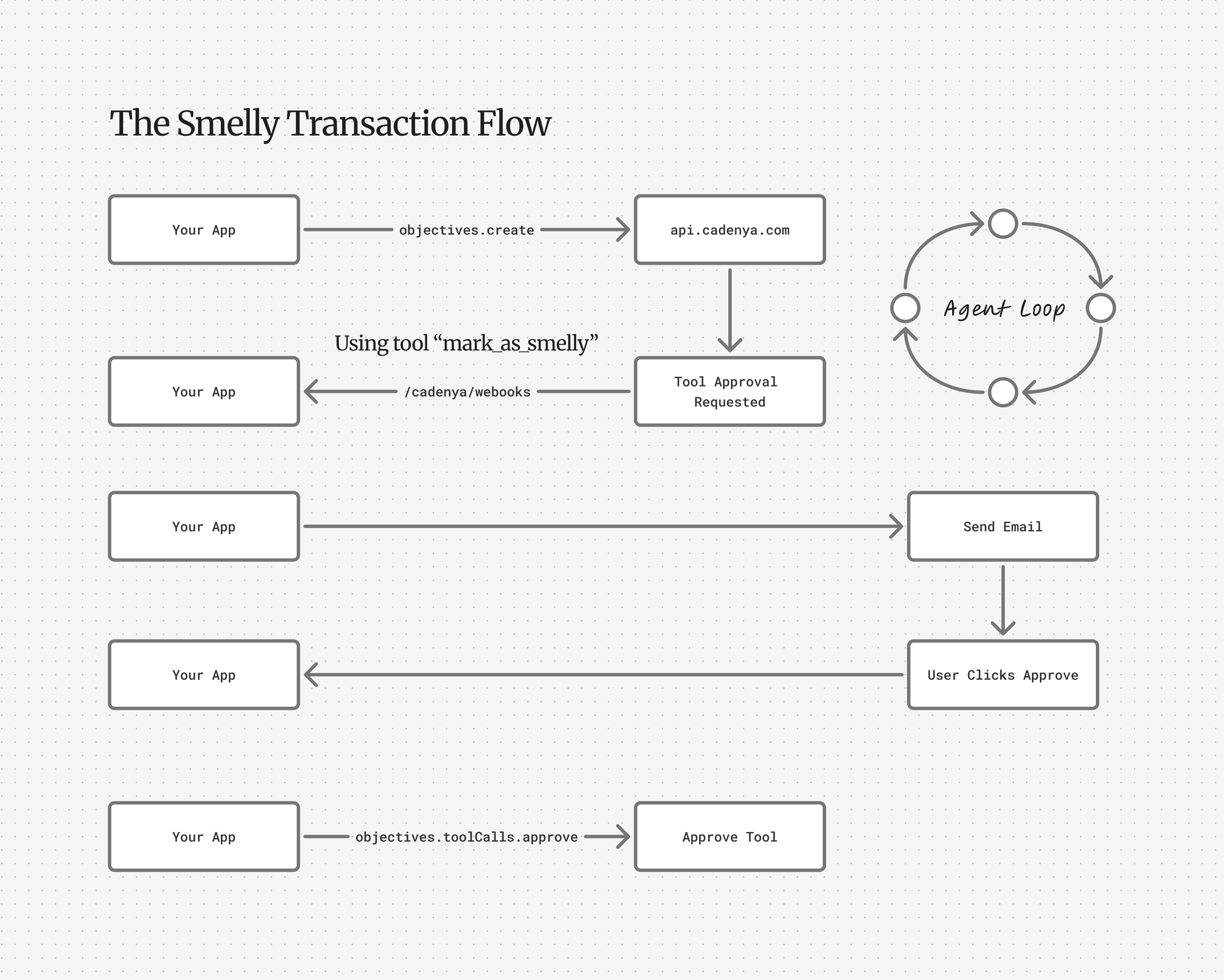
Say you are building the next expense tracking application (because there aren't enough), and you want an AI Agent to validate and run smell checks on the receipt for you. If the receipt is suspicious, the agent might ask for approval before marking it as completed.
Your agent's system prompt might resemble this:
```text theme={null}
You are an expense report manager that validates expenses match our general company policy.
You will be given the details of a receipt, and you must validate them against our corporate policy in the memory company/expenses/policy.md.
If a receipt is "smelly" (for example, a road trip to Las Vegas to meet a client, capped with a speakeasy),
call the confirm_smell tool to request a second glance from the employee's manager.
```
Building in TypeScript, Go, or Ruby? The Cadenya SDK verifies the signature and parses the payload for you with `webhooks.unwrap`. The [Approving a tool](/docs/guides/callbacks/approving-a-tool) and [Email updates from an objective](/docs/guides/callbacks/streaming-objective-events) guides build the full handler. The HMAC steps below show the mechanism by hand, for a language without an SDK helper or when you want to see what `unwrap` does under the hood.
## Recommended tools
Two tools pair well with agent webhooks: Svix Play as a destination, and the Standard Webhooks verifier, while you build against Cadenya.
* [Svix Play](https://play.svix.com/)
* [Standard Webhooks Verifier](https://www.standardwebhooks.com/verify)
## Webhooks
Webhooks sent by Cadenya conform to [Standard Webhooks](https://www.standardwebhooks.com/). They are delivered as POST requests with a JSON envelope containing `type`, `timestamp`, and `data` (with flat `agent`, `agentVariation`, `objective`, and `objectiveEvent` keys). Signed via Standard Webhooks HMAC-SHA256 (`webhook-id`, `webhook-timestamp`, `webhook-signature` headers).
| Type | Description |
| ------------------------------------------ | -------------------------------------------------------------------------------------------------------------------------------------------------------------------------------------------------------------- |
| `objective_event.user_message` | Triggered when a user message event occurs in an objective. |
| `objective_event.assistant_message` | Triggered when an assistant message event occurs in an objective. |
| `objective_event.tool_called` | Triggered when a tool call is executed in an objective. |
| `objective_event.tool_result` | Triggered when a tool result event occurs in an objective. |
| `objective_event.tool_error` | Triggered when a tool call encounters an error during execution. |
| `objective_event.tool_approval_requested` | Triggered when a tool call requires approval (respond via [Approve a tool call](/docs/api-reference/objectiveservice/approve-a-tool-call) or [Deny a tool call](/docs/api-reference/objectiveservice/deny-a-tool-call)). |
| `objective_event.tool_approved` | Triggered when a tool call is approved via [Approve a tool call](/docs/api-reference/objectiveservice/approve-a-tool-call). |
| `objective_event.tool_denied` | Triggered when a tool call is denied via [Deny a tool call](/docs/api-reference/objectiveservice/deny-a-tool-call). |
| `objective_event.sub_agent_spawned` | Triggered when a sub-agent is spawned as a child objective from a parent. |
| `objective_event.sub_agent_updated` | Triggered when a spawned sub-agent's child objective makes progress. |
| `objective_event.context_window_compacted` | Triggered when the objective compacts its context window. |
| `objective_event.memory_read` | Defined, but never delivered. A `get_memory` call arrives as `objective_event.tool_called`. |
| `objective_event.finalized` | Triggered when the objective finishes. Carries the structured output when the agent has an output schema. |
| `objective_event.cancelled` | Triggered when the objective is cancelled. |
| `objective_event.timed_out` | Triggered when the objective hits its inactivity timeout. |
| `objective_event.notice` | Triggered for informational notices during the run. |
| `objective_event.error` | Meant to fire when an objective fails, but not emitted today. A failed objective sends no event, so detect failure by polling the objective's `state`. |
## Handling a webhook
Cadenya webhooks contain `metadata` keys with the information about the event. For example, an `objective_event.assistant_message` looks like this:
```json theme={null}
{
"timestamp": "2026-05-04T12:51:57Z",
"type": "objective_event.assistant_message",
"data": {
"agent": {
"id": "agent_01KQSGJRXYYR2W2Y34XXGPTQS9",
"accountId": "account_01KQSF7M1S6S49WK2GSSYFRSHY",
"workspaceId": "workspace_01KQSF7NQX9BMWKEFY06VDTDP4",
"name": "Urgent Car Insurance Agent",
"createdAt": "2026-05-04T12:49:32.094034Z"
},
"agentVariation": {
"id": "agentvar_01KQSGJRZ8Y40AFHK0JE0YAD45",
"accountId": "account_01KQSF7M1S6S49WK2GSSYFRSHY",
"workspaceId": "workspace_01KQSF7NQX9BMWKEFY06VDTDP4",
"name": "Default",
"createdAt": "2026-05-04T12:49:32.136648Z"
},
"objective": {
"id": "obj_01KQSGKYGKPXBNJMCRRETCP63X",
"accountId": "account_01KQSF7M1S6S49WK2GSSYFRSHY",
"workspaceId": "workspace_01KQSF7NQX9BMWKEFY06VDTDP4",
"createdAt": "2026-05-04T12:50:10.579393Z",
"profileId": "profile_01KQSF7NJ4KD83P8AEH69NXNFM"
},
"objectiveEvent": {
"metadata": {
"id": "objevt_01KQSGQ6CRV0GJ4JTQ6NV8BF19",
"accountId": "account_01KQSF7M1S6S49WK2GSSYFRSHY",
"workspaceId": "workspace_01KQSF7NQX9BMWKEFY06VDTDP4",
"createdAt": "2026-05-04T12:51:56.952342057Z"
},
"data": {
"type": "assistantMessage",
"assistantMessage": {
"content": "Looks like you're trying to urgently contact someone about their cars insurance."
}
},
"contextWindowId": "objwin_01KQSGKYWQJSS9NS7DF7GMY4KM"
}
}
}
```
## Handling HMAC
Cadenya webhooks follow [Standard Webhooks](https://www.standardwebhooks.com/), verified with HMAC. Find the signing secret on the **Webhooks** page of your [account settings](https://app.cadenya.com), where you can also rotate it. Most languages have a Standard Webhooks library that verifies for you, Ruby included, and it decodes the base64 secret and checks the signature in one call. The Cadenya Ruby SDK wraps exactly that in `webhooks.unwrap`. To show the mechanism underneath, here it is by hand in Ruby.
First, here's an example of a request your server receives:
```http theme={null}
POST /your/callback HTTP/1.1
Host: example.com
Content-Type: application/json
User-Agent: cadenya-golfswing (cadenya.com)
webhook-id: wh_01J... # stable per webhook delivery
webhook-timestamp: 1714838400 # unix seconds
webhook-signature: v1,K8s9...= # base64 HMAC-SHA256, "v1," prefixed
{"timestamp":"2026-05-04T17:20:00Z","type":"objective_event.finalized","data":{...}}
```
The signed string is `{webhook-id}.{webhook-timestamp}.{raw-body}`, HMAC'd with your account's webhook signing key. That key arrives as `whsec_`: strip the `whsec_` prefix and base64-decode the rest to the raw bytes you sign with.
Ruby verifier (Sinatra-style)
```ruby theme={null}
# app.rb
require 'openssl'
require 'base64'
# The secret from app.cadenya.com is whsec_. Strip the prefix and
# base64-decode it to the raw HMAC key the signature was computed with.
SIGNING_KEY = Base64.decode64(ENV.fetch('CADENYA_WEBHOOK_SECRET').delete_prefix('whsec_'))
post '/webhooks/cadenya' do
body = request.body.read
webhook_id = request.env['HTTP_WEBHOOK_ID']
timestamp = request.env['HTTP_WEBHOOK_TIMESTAMP']
received = request.env['HTTP_WEBHOOK_SIGNATURE'] # "v1,"
halt 400, 'missing headers' unless webhook_id && timestamp && received
halt 400, 'stale' if (Time.now.to_i - timestamp.to_i).abs > 300
signed_payload = "#{webhook_id}.#{timestamp}.#{body}"
digest = OpenSSL::HMAC.digest('sha256', SIGNING_KEY, signed_payload)
expected = "v1,#{Base64.strict_encode64(digest)}"
halt 401, 'bad signature' unless Rack::Utils.secure_compare(expected, received)
status 204
end
```
## Example workflow
Say you want to let a user know when your AI Agent is requesting permission to use a tool. For example: approving an expense for a user. The flow would look like:
1. Cadenya sends your application a webhook
2. Your application sends an email to the user with a link to approve or reject
3. The customer clicks the "approve" link which is hosted by your app, and then sends Cadenya an [approve tool call](/docs/api-reference/objectiveservice/approve-a-tool-call) API request.
4. Your AI Agent in Cadenya continues
You'd have a small app that looks like this in Ruby:
```ruby theme={null}
# app-with-tool-approval.rb
require 'sinatra'
require 'json'
require 'openssl'
require 'base64'
require 'net/http'
require 'uri'
require 'mail'
CADENYA_SIGNING_KEY = Base64.decode64(ENV.fetch('CADENYA_WEBHOOK_SECRET').delete_prefix('whsec_'))
CADENYA_API_KEY = ENV.fetch('CADENYA_API_KEY')
CADENYA_API_BASE = ENV.fetch('CADENYA_API_BASE', 'https://api.cadenya.com')
APP_BASE_URL = ENV.fetch('APP_BASE_URL', 'http://localhost:4567')
LINK_SIGNING_KEY = ENV.fetch('LINK_SIGNING_KEY')
Mail.defaults { delivery_method :smtp, address: ENV['SMTP_HOST'], port: 587 }
post '/webhooks/cadenya' do
body = request.body.read
webhook_id = request.env['HTTP_WEBHOOK_ID']
ts = request.env['HTTP_WEBHOOK_TIMESTAMP']
received = request.env['HTTP_WEBHOOK_SIGNATURE']
digest = OpenSSL::HMAC.digest('sha256', CADENYA_SIGNING_KEY, "#{webhook_id}.#{ts}.#{body}")
expected = "v1,#{Base64.strict_encode64(digest)}"
halt 401 unless Rack::Utils.secure_compare(expected, received)
event = JSON.parse(body)
return 204 unless event['type'] == 'objective_event.tool_approval_requested'
data = event['data']
workspace_id = data['objective']['workspaceId']
objective_id = data['objective']['id']
tool_call_id = data['objectiveEvent']['data']['toolApprovalRequested']['toolCallId']
agent_name = data['agent']['name']
token = sign_link(workspace_id, objective_id, tool_call_id)
Mail.deliver do
to 'user@example.com'
from 'agents@example.com'
subject "#{agent_name} needs your approval"
body <<~TXT
Approve: #{APP_BASE_URL}/decide/approve?t=#{token}
Deny: #{APP_BASE_URL}/decide/deny?t=#{token}
TXT
end
204
end
get '/decide/:decision' do
workspace_id, objective_id, tool_call_id = verify_link(params[:t])
action = params[:decision] == 'approve' ? 'approve' : 'deny'
uri = URI("#{CADENYA_API_BASE}/v1/workspaces/#{workspace_id}/objectives/#{objective_id}/tool_calls/#{tool_call_id}:#{action}")
req = Net::HTTP::Post.new(uri)
req['Authorization'] = "Bearer #{CADENYA_API_KEY}"
req['Content-Type'] = 'application/json'
req.body = '{}'
Net::HTTP.start(uri.host, uri.port, use_ssl: true) { |h| h.request(req) }
"Tool call #{action}d. The agent will continue."
end
def sign_link(*parts)
payload = parts.join('|') + "|#{Time.now.to_i + 86_400}"
sig = OpenSSL::HMAC.hexdigest('sha256', LINK_SIGNING_KEY, payload)
Base64.urlsafe_encode64("#{payload}|#{sig}", padding: false)
end
def verify_link(token)
raw = Base64.urlsafe_decode64(token)
workspace_id, objective_id, tool_call_id, exp, sig = raw.split('|')
payload = "#{workspace_id}|#{objective_id}|#{tool_call_id}|#{exp}"
expected = OpenSSL::HMAC.hexdigest('sha256', LINK_SIGNING_KEY, payload)
halt 401 unless Rack::Utils.secure_compare(expected, sig) && Time.now.to_i <= exp.to_i
[workspace_id, objective_id, tool_call_id]
end
```
## Use case: smelly expenses
Say you are building the next expense tracking application (because there aren't enough), and you want an AI Agent to validate and run smell checks on the receipt for you. If the receipt is suspicious, the agent might ask for approval before marking it as completed.
Your agent's system prompt might resemble this:
```text theme={null}
You are an expense report manager that validates expenses match our general company policy.
You will be given the details of a receipt, and you must validate them against our corporate policy in the memory company/expenses/policy.md.
If a receipt is "smelly" (for example, a road trip to Las Vegas to meet a client, capped with a speakeasy),
call the confirm_smell tool to request a second glance from the employee's manager.
```
 ## Tricks
It is recommended to leverage the `externalId` and `labels` fields of any metadata key in Cadenya to track your own state. For example, if the receipt in *your own database* has an ID of `receipt_cy1shs`, you can store it in the externalId of your objective on create:
```bash theme={null}
curl https://api.cadenya.com/v1/workspaces/$WORKSPACE_ID/objectives \
-H 'Content-Type: application/json' \
-H "Authorization: Bearer $CADENYA_API_KEY" \
-d '{
"agentId": "external_id:receipt-auditor",
"systemPromptData": {},
"metadata": {
"externalId": "receipt_cy1shs"
}
}'
```
Now, when Cadenya sends you webhooks during the agent's loop, you *always* receive that `externalId` you assigned in the payload:
```json theme={null}
{
"type": "objective_event.tool_approval_requested",
"timestamp": "2026-05-04T17:20:00Z",
"data": {
"objective": {
"id": "obj_01J...",
"externalId": "receipt_cy1shs" # <-- your ID
},
"objectiveEvent": {
"data": {
"type": "toolApprovalRequested",
"toolApprovalRequested": { "toolCallId": "toolcall_01J..." }
}
}
}
}
```
## Tricks
It is recommended to leverage the `externalId` and `labels` fields of any metadata key in Cadenya to track your own state. For example, if the receipt in *your own database* has an ID of `receipt_cy1shs`, you can store it in the externalId of your objective on create:
```bash theme={null}
curl https://api.cadenya.com/v1/workspaces/$WORKSPACE_ID/objectives \
-H 'Content-Type: application/json' \
-H "Authorization: Bearer $CADENYA_API_KEY" \
-d '{
"agentId": "external_id:receipt-auditor",
"systemPromptData": {},
"metadata": {
"externalId": "receipt_cy1shs"
}
}'
```
Now, when Cadenya sends you webhooks during the agent's loop, you *always* receive that `externalId` you assigned in the payload:
```json theme={null}
{
"type": "objective_event.tool_approval_requested",
"timestamp": "2026-05-04T17:20:00Z",
"data": {
"objective": {
"id": "obj_01J...",
"externalId": "receipt_cy1shs" # <-- your ID
},
"objectiveEvent": {
"data": {
"type": "toolApprovalRequested",
"toolApprovalRequested": { "toolCallId": "toolcall_01J..." }
}
}
}
}
```