> ## Documentation Index
> Fetch the complete documentation index at: https://cadenya.com/docs/llms.txt
> Use this file to discover all available pages before exploring further.
# Run an agent on a schedule
> Configure a calendar or interval cadence in the dashboard, control overlap and variation selection, and inspect the objectives it creates.
An agent schedule creates a normal objective on a recurring cadence. Cadenya owns the timer, timezone, overlap policy, and objective inputs, so your application does not need its own cron worker.
## What you need
* A published agent with at least one variation.
* A first user message or a `firstUserMessageTemplate` on every variation the schedule can select.
* Valid system prompt data when the agent defines `systemPromptDataSchema`.
## Create a schedule
Open the agent and select **Schedules**. Click **Add Schedule**.
Enter a name such as `Weekday attendee sample`, then configure the objective input:
| Field | Example | Behavior |
| --------------------------- | ---------------------------------------------------------------------------- | -------------------------------------------------------------------------------------------- |
| **First user message** | `Create one attendee record with a name, email, company, city, and country.` | Explicit message for every fired objective |
| **First user message data** | Optional JSON | Renders the selected variation's first user message template when no explicit message is set |
| **System prompt data** | JSON that satisfies the agent schema | Appears when the agent defines a system prompt data schema |
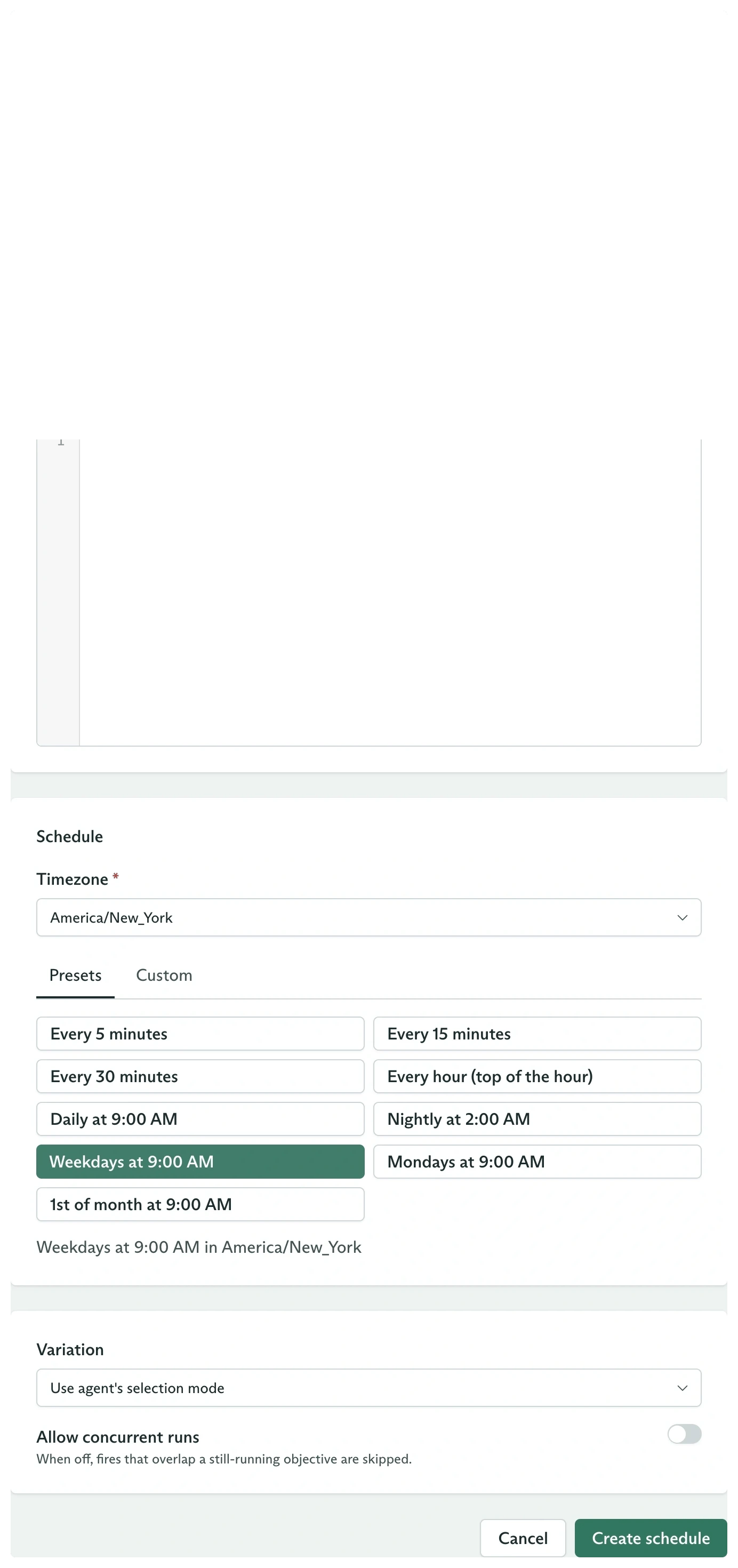
Under **Schedule**, choose:
* **Presets** for a common cadence.
* **Custom** to add one or more **Calendar rules** or **Interval rules**.
Set the timezone to `America/New_York`. For a weekday 9:00 AM digest, add a calendar rule with hour `9`, minute `0`, and day of week `1` through `5`.
 ## Choose variation and overlap behavior
The lower configuration card contains:
| Control | Default | Meaning |
| ------------------------- | ------- | ---------------------------------------------------------------------------------- |
| **Variation** | Empty | The agent's Random or Feedback Driven mode selects one on every fire |
| **Allow concurrent runs** | Off | A fire is skipped while the previous objective from this schedule is still running |
Pin a variation when every scheduled run must use one exact configuration. Leave it empty when scheduled traffic should participate in the agent's normal variation sampling.
Turn on concurrent runs only when overlapping objectives are safe and intentional.
## Create the same schedule with the SDK
```typescript theme={null}
const schedule = await client.agents.schedules.create(agentId, {
workspaceId,
metadata: {
name: 'Weekday attendee sample',
externalId: 'weekday-attendee-sample',
},
spec: {
firstUserMessage:
'Create one attendee record with a name, email, company, city, and country.',
schedule: {
timezone: 'America/New_York',
calendars: [
{
hour: [{ start: 9 }],
minute: [{ start: 0 }],
dayOfWeek: [{ start: 1, end: 5 }],
},
],
},
overlapPolicy: 'OVERLAP_POLICY_SKIP',
},
});
console.log(schedule.state, schedule.info?.nextFireAt);
```
The schedule starts in `STATE_ACTIVE`.
## Use an interval
An interval fires every duration from a stable anchor:
```typescript theme={null}
const hourly = await client.agents.schedules.create(agentId, {
workspaceId,
metadata: {
name: 'Hourly sweep',
externalId: 'hourly-sweep',
},
spec: {
firstUserMessage:
'Check for stalled tickets and identify their owners.',
schedule: {
timezone: 'America/New_York',
intervals: [{ every: '3600s' }],
},
overlapPolicy: 'OVERLAP_POLICY_SKIP',
},
});
```
The shortest supported interval is `60s`. An optional `offset` shifts the fire within that interval and must be shorter than `every`.
Calendar and interval rules are ORed. A schedule fires whenever any configured rule matches.
## Inspect fires
The **Schedules** table shows:
* **Cadence**
* **Status**
* **Next fire**
* **Last fire**
* **Runs**
When a schedule fires, open its linked **Last fire** or the agent's **Objectives** tab. The objective snapshot includes `configSnapshot.agentSchedule`, so it records the schedule and selected variation used at creation.
From code:
```typescript theme={null}
const current = await client.agents.schedules.retrieve(
agentId,
schedule.metadata.id,
{ workspaceId },
);
console.log({
nextFireAt: current.info?.nextFireAt,
lastFireAt: current.info?.lastFireAt,
lastObjectiveId: current.info?.lastObjectiveId,
lastSkipReason: current.info?.lastSkipReason,
totalFires: current.info?.totalFires,
});
```
Filter objective history by schedule:
```typescript theme={null}
for await (const objective of client.objectives.list({
workspaceId,
agentScheduleId: schedule.metadata.id,
})) {
console.log(objective.metadata.id, objective.state);
}
```
## Pause, resume, or archive
Open the row menu to **Pause**, **Resume**, **Archive**, or **Delete**.
The same lifecycle is explicit in the SDK:
```typescript theme={null}
await client.agents.schedules.pause(
agentId,
schedule.metadata.id,
{ workspaceId },
);
await client.agents.schedules.resume(
agentId,
schedule.metadata.id,
{ workspaceId },
);
await client.agents.schedules.archive(
agentId,
schedule.metadata.id,
{ workspaceId },
);
```
Paused schedules retain their history and can resume. Archived schedules are terminal and cannot resume.
An unpublished agent cannot run scheduled objectives. Cadenya pauses the underlying timers for its active schedules and reconciles them when the agent is published again.
Decide whether each fire samples a candidate or pins one.
Inspect the snapshot and event timeline created by every fire.
## Choose variation and overlap behavior
The lower configuration card contains:
| Control | Default | Meaning |
| ------------------------- | ------- | ---------------------------------------------------------------------------------- |
| **Variation** | Empty | The agent's Random or Feedback Driven mode selects one on every fire |
| **Allow concurrent runs** | Off | A fire is skipped while the previous objective from this schedule is still running |
Pin a variation when every scheduled run must use one exact configuration. Leave it empty when scheduled traffic should participate in the agent's normal variation sampling.
Turn on concurrent runs only when overlapping objectives are safe and intentional.
## Create the same schedule with the SDK
```typescript theme={null}
const schedule = await client.agents.schedules.create(agentId, {
workspaceId,
metadata: {
name: 'Weekday attendee sample',
externalId: 'weekday-attendee-sample',
},
spec: {
firstUserMessage:
'Create one attendee record with a name, email, company, city, and country.',
schedule: {
timezone: 'America/New_York',
calendars: [
{
hour: [{ start: 9 }],
minute: [{ start: 0 }],
dayOfWeek: [{ start: 1, end: 5 }],
},
],
},
overlapPolicy: 'OVERLAP_POLICY_SKIP',
},
});
console.log(schedule.state, schedule.info?.nextFireAt);
```
The schedule starts in `STATE_ACTIVE`.
## Use an interval
An interval fires every duration from a stable anchor:
```typescript theme={null}
const hourly = await client.agents.schedules.create(agentId, {
workspaceId,
metadata: {
name: 'Hourly sweep',
externalId: 'hourly-sweep',
},
spec: {
firstUserMessage:
'Check for stalled tickets and identify their owners.',
schedule: {
timezone: 'America/New_York',
intervals: [{ every: '3600s' }],
},
overlapPolicy: 'OVERLAP_POLICY_SKIP',
},
});
```
The shortest supported interval is `60s`. An optional `offset` shifts the fire within that interval and must be shorter than `every`.
Calendar and interval rules are ORed. A schedule fires whenever any configured rule matches.
## Inspect fires
The **Schedules** table shows:
* **Cadence**
* **Status**
* **Next fire**
* **Last fire**
* **Runs**
When a schedule fires, open its linked **Last fire** or the agent's **Objectives** tab. The objective snapshot includes `configSnapshot.agentSchedule`, so it records the schedule and selected variation used at creation.
From code:
```typescript theme={null}
const current = await client.agents.schedules.retrieve(
agentId,
schedule.metadata.id,
{ workspaceId },
);
console.log({
nextFireAt: current.info?.nextFireAt,
lastFireAt: current.info?.lastFireAt,
lastObjectiveId: current.info?.lastObjectiveId,
lastSkipReason: current.info?.lastSkipReason,
totalFires: current.info?.totalFires,
});
```
Filter objective history by schedule:
```typescript theme={null}
for await (const objective of client.objectives.list({
workspaceId,
agentScheduleId: schedule.metadata.id,
})) {
console.log(objective.metadata.id, objective.state);
}
```
## Pause, resume, or archive
Open the row menu to **Pause**, **Resume**, **Archive**, or **Delete**.
The same lifecycle is explicit in the SDK:
```typescript theme={null}
await client.agents.schedules.pause(
agentId,
schedule.metadata.id,
{ workspaceId },
);
await client.agents.schedules.resume(
agentId,
schedule.metadata.id,
{ workspaceId },
);
await client.agents.schedules.archive(
agentId,
schedule.metadata.id,
{ workspaceId },
);
```
Paused schedules retain their history and can resume. Archived schedules are terminal and cannot resume.
An unpublished agent cannot run scheduled objectives. Cadenya pauses the underlying timers for its active schedules and reconciles them when the agent is published again.
Decide whether each fire samples a candidate or pins one.
Inspect the snapshot and event timeline created by every fire.