> ## Documentation Index
> Fetch the complete documentation index at: https://cadenya.com/docs/llms.txt
> Use this file to discover all available pages before exploring further.
# Prevent tool bloat
> Filter the reachable catalog, enable progressive discovery on a variation, and load exact tool definitions only when an objective needs them.
Assigning a tool set normally makes every available tool definition callable when an objective starts. That is useful for a small set. With dozens or hundreds of operations, those schemas consume context before the agent does any work.
Progressive discovery keeps the schemas out of the initial callable set. The objective starts with a catalog of exact tool names and Cadenya's built-in `tool_search`. The agent loads only the named tools it needs.
## Filter first, discover second
The two controls solve different problems:
| Control | Configured on | Decides |
| --------------------------- | --------------- | ------------------------------------------------------------------------- |
| Include and exclude filters | Tool set | Which tools are reachable at all |
| Progressive discovery | Agent variation | Which reachable definitions enter this objective's current context window |
An omitted tool cannot be discovered. An available tool can be discovered only when its tool set or the individual tool is assigned to the variation.
Start with [Filter tools and require approval](/docs/guides/tool-sets/filter-and-approve) when the source exposes operations the agent should never reach.
## Assign the tool set
Open the agent, stay on **Variations**, select the target variation, and click **Add** under **Assignments**. Choose **Tool Set**, search for the filtered tool set, and select it.
 Assigning the set establishes reachability. The next setting changes when its definitions load.
## Enable progressive discovery
Edit the variation and turn on **Enable progressive tool discovery**.
Configure:
| Field | Recommended starting value | Behavior |
| ------------------------ | ------------------------------------------- | ---------------------------------------------------- |
| **Max tools per search** | `3` | Maximum exact names one `tool_search` call may load |
| **Search hints** | Terms such as `profile`, `address`, `email` | Guidance appended to the discoverable-tools appendix |
Assigning the set establishes reachability. The next setting changes when its definitions load.
## Enable progressive discovery
Edit the variation and turn on **Enable progressive tool discovery**.
Configure:
| Field | Recommended starting value | Behavior |
| ------------------------ | ------------------------------------------- | ---------------------------------------------------- |
| **Max tools per search** | `3` | Maximum exact names one `tool_search` call may load |
| **Search hints** | Terms such as `profile`, `address`, `email` | Guidance appended to the discoverable-tools appendix |
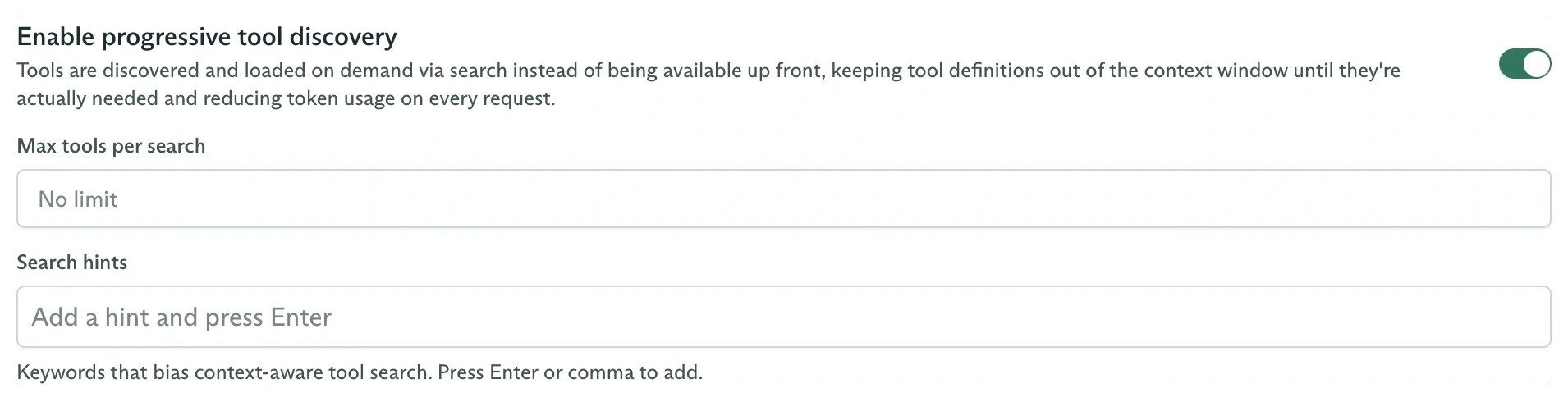 Hints guide the model's choice. They do not filter, search, or rank the catalog. `tool_search` accepts exact names copied from the catalog.
Leaving **Max tools per search** empty means no configured batch cap. A nonzero cap returns an error when one call requests too many names, so the model can retry with smaller batches.
## Configure the same behavior with the SDK
```typescript theme={null}
const variation = await client.agents.variations.create(agentId, {
workspaceId,
metadata: {
name: 'Progressive',
externalId: 'progressive',
},
spec: {
systemPromptTemplate:
'Use the assigned Faker tools to create the requested synthetic data.',
modelConfig: {
modelId,
temperature: 0.2,
},
progressiveDiscovery: {
maxTools: 3,
hints: ['profile', 'address', 'email'],
},
},
});
await client.agents.variations.addAssignment(
agentId,
variation.metadata.id,
{
workspaceId,
type: 'toolSetId',
toolSetId: 'external_id:faker-mcp',
},
);
```
The presence of `progressiveDiscovery`, even with no fields, enables the behavior.
## Run an objective and inspect the timeline
Publish the agent and dispatch a request that needs an assigned tool:
```typescript theme={null}
const objective = await client.objectives.create({
workspaceId,
agentId,
variationId: variation.metadata.id,
systemPromptData: {},
firstUserMessage:
'Create one synthetic attendee with a name and email address.',
});
```
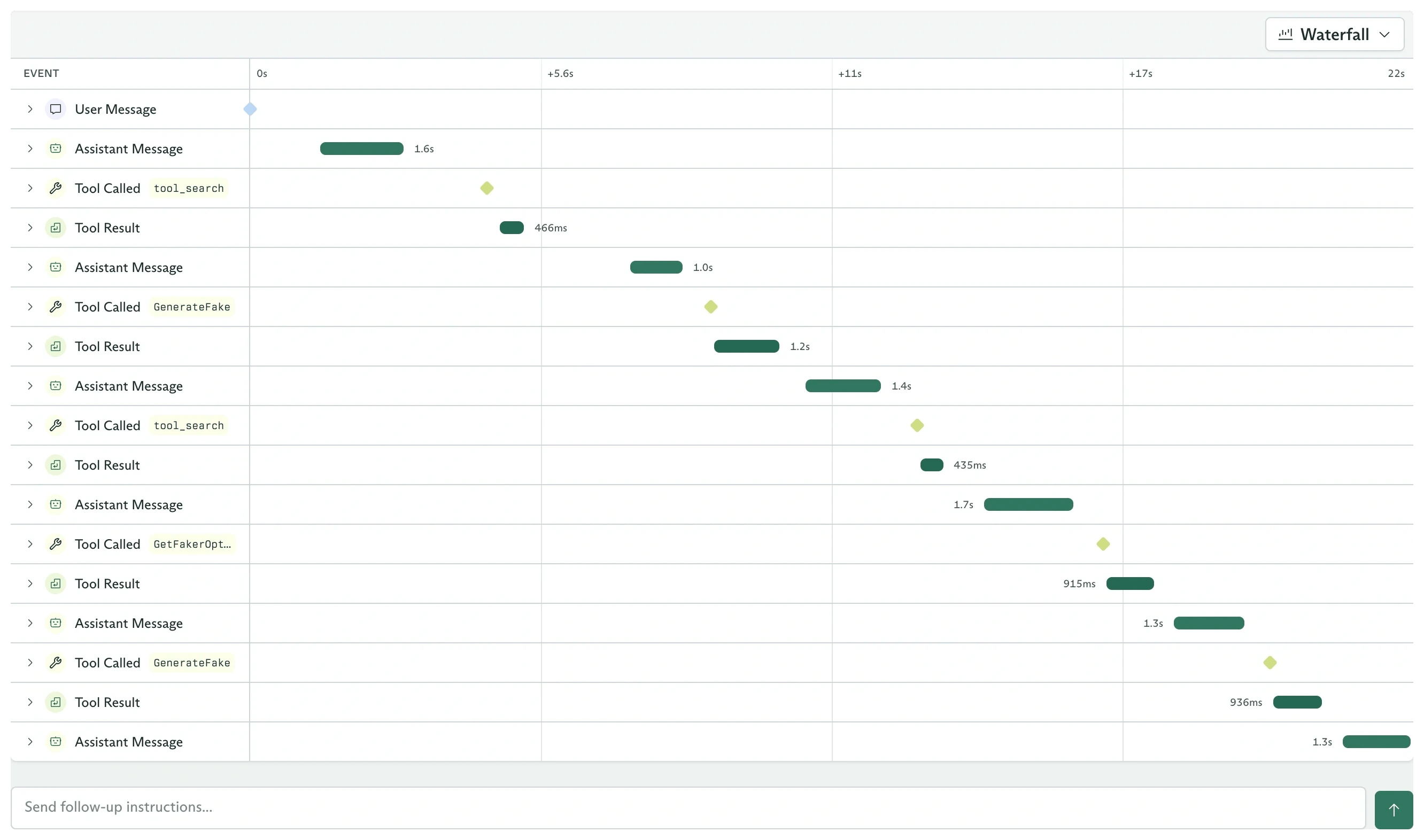
The timeline should show:
1. **Tool Called** for the built-in `tool_search`, with one or more exact `toolNames`.
2. **Tool Result** reporting which definitions were loaded.
3. **Tool Called** for a newly loaded assigned tool.
Hints guide the model's choice. They do not filter, search, or rank the catalog. `tool_search` accepts exact names copied from the catalog.
Leaving **Max tools per search** empty means no configured batch cap. A nonzero cap returns an error when one call requests too many names, so the model can retry with smaller batches.
## Configure the same behavior with the SDK
```typescript theme={null}
const variation = await client.agents.variations.create(agentId, {
workspaceId,
metadata: {
name: 'Progressive',
externalId: 'progressive',
},
spec: {
systemPromptTemplate:
'Use the assigned Faker tools to create the requested synthetic data.',
modelConfig: {
modelId,
temperature: 0.2,
},
progressiveDiscovery: {
maxTools: 3,
hints: ['profile', 'address', 'email'],
},
},
});
await client.agents.variations.addAssignment(
agentId,
variation.metadata.id,
{
workspaceId,
type: 'toolSetId',
toolSetId: 'external_id:faker-mcp',
},
);
```
The presence of `progressiveDiscovery`, even with no fields, enables the behavior.
## Run an objective and inspect the timeline
Publish the agent and dispatch a request that needs an assigned tool:
```typescript theme={null}
const objective = await client.objectives.create({
workspaceId,
agentId,
variationId: variation.metadata.id,
systemPromptData: {},
firstUserMessage:
'Create one synthetic attendee with a name and email address.',
});
```
The timeline should show:
1. **Tool Called** for the built-in `tool_search`, with one or more exact `toolNames`.
2. **Tool Result** reporting which definitions were loaded.
3. **Tool Called** for a newly loaded assigned tool.
 The TypeScript event payload uses a callable-tool union. Built-ins have `type: 'cadenyaProvidedTool'`:
```typescript theme={null}
for await (const event of client.objectives.listEvents(
objective.metadata.id,
{ workspaceId },
)) {
const data = event.data;
if (data.type !== 'toolCalled') continue;
const called = data.toolCalled.tool;
const name =
called?.type === 'tool'
? called.tool.name
: called?.type === 'cadenyaProvidedTool'
? called.cadenyaProvidedTool.name
: called?.agent.name;
console.log(name);
}
```
## What compaction changes
Discovered definitions belong to the objective's current context window. When compaction creates a new window, the objective starts that window without those previously loaded tool definitions and can call `tool_search` again.
Sub-agents are different. A sub-agent assignment remains directly callable and is not gated by progressive discovery.
Set the reachable boundary before a variation searches it.
Choose between an individual tool, complete tool set, or sub-agent.
The TypeScript event payload uses a callable-tool union. Built-ins have `type: 'cadenyaProvidedTool'`:
```typescript theme={null}
for await (const event of client.objectives.listEvents(
objective.metadata.id,
{ workspaceId },
)) {
const data = event.data;
if (data.type !== 'toolCalled') continue;
const called = data.toolCalled.tool;
const name =
called?.type === 'tool'
? called.tool.name
: called?.type === 'cadenyaProvidedTool'
? called.cadenyaProvidedTool.name
: called?.agent.name;
console.log(name);
}
```
## What compaction changes
Discovered definitions belong to the objective's current context window. When compaction creates a new window, the objective starts that window without those previously loaded tool definitions and can call `tool_search` again.
Sub-agents are different. A sub-agent assignment remains directly callable and is not gated by progressive discovery.
Set the reachable boundary before a variation searches it.
Choose between an individual tool, complete tool set, or sub-agent.