> ## Documentation Index
> Fetch the complete documentation index at: https://cadenya.com/docs/llms.txt
> Use this file to discover all available pages before exploring further.
# How memory layers work
> Give your agents context without overloading the context window. Memory layers let agents read knowledge on demand.
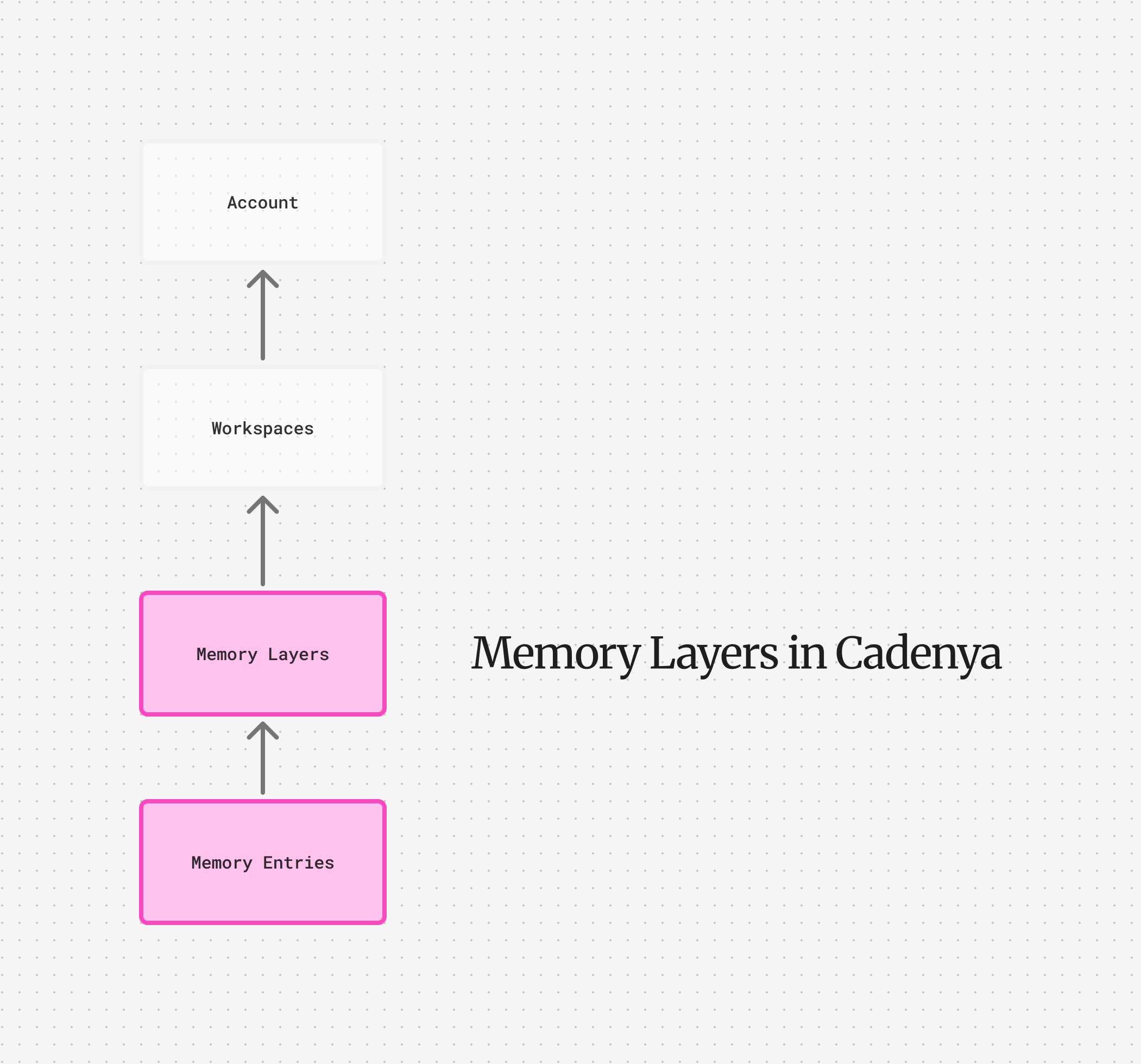 Memory layers give your agent context without overloading the context window. A layer holds entries, and when it is assigned to an agent, only a lightweight **manifest** of those entries, their keys and one-line descriptions, goes into the system prompt. The agent reads the manifest, decides what it needs, and pulls a single entry's full content on demand with the `get_memory` tool. Nothing heavy loads until the agent asks for it. To set one up step by step, see [Give your agent memory](/docs/guides/give-your-agent-memory).
The layers you create are skills layers (`type: "MEMORY_LAYER_TYPE_SKILLS"`, the only type worth creating by hand). Episodic layers, the memory an agent writes for itself, are created and managed by the runtime. A hand-made episodic layer is not system-managed, so nothing attaches it to an objective and no agent ever writes to it. See [Episodic memory](#episodic-memory).
## Entries
Memory layers consist of entries. An entry holds three things: a `key` (its lookup id, think of it as a file path), a one-line `description` (the "when to use this" hint that shows in the manifest), and the `content` (the body the agent loads on demand). The content might be your agent's prose, how to reset a database, or how to reply to a tricky question.
The agent sees every entry's key and description up front, then loads a body only when it calls `get_memory` with the key. When it does not know the exact key, `search_memory` finds entries by a query across keys and descriptions, then hands back the key to load. A sharp description is what lets the agent pick the right entry, so write it like a label, not an afterthought. A layer can hold many entries, but a bloated manifest is harder for the agent to read, so keep each layer focused.
## The cascade
The set of layers an objective resolves keys against is its **memory cascade**. It works the way CSS resolution works: when a key appears in more than one layer, the most specific layer wins. The runtime checks each layer in cascade order, and the first one that has the key takes it. Everything below is shadowed for that key.
When you assign a memory layer to an agent variation, the assignment takes a `position`. A lower position is more specific, so position zero wins a key clash. For example, you may have a "base" memory layer that contains basic prose, and simple standard operating procedures that you assign to all of your agents.
For example:
```
# base-customer
- prose.md
- customer-support-procedures.md
```
But you might also have a *second* memory layer that also has:
```
# high-touch-customer
- prose.md
- very-upset-customer-procedures.md
```
If your agent variation loads both `high-touch-customer` (Position #0) and `base-customer` (Position #1), they receive *three entries* of memory. **Yes, three, not five.**
That's because memory layers act as masks. The layer closest to position zero is the most specific, so it wins when a key is present in both. So an agent variation with both of these memory layers has these entries available to it:
1. `prose.md` - From `high-touch-customer`, which changes the tone of the agent to be more sensitive.
2. `customer-support-procedures.md` - From the base customer layer.
3. `very-upset-customer-procedures.md` - Only loaded for the high-touch-customer layer.
Think of memory layers like CSS specificity or Docker layers. The layer
closest to position zero wins when keys collide.
## Memory layers on objectives
Memory layers give your agent context without overloading the context window. A layer holds entries, and when it is assigned to an agent, only a lightweight **manifest** of those entries, their keys and one-line descriptions, goes into the system prompt. The agent reads the manifest, decides what it needs, and pulls a single entry's full content on demand with the `get_memory` tool. Nothing heavy loads until the agent asks for it. To set one up step by step, see [Give your agent memory](/docs/guides/give-your-agent-memory).
The layers you create are skills layers (`type: "MEMORY_LAYER_TYPE_SKILLS"`, the only type worth creating by hand). Episodic layers, the memory an agent writes for itself, are created and managed by the runtime. A hand-made episodic layer is not system-managed, so nothing attaches it to an objective and no agent ever writes to it. See [Episodic memory](#episodic-memory).
## Entries
Memory layers consist of entries. An entry holds three things: a `key` (its lookup id, think of it as a file path), a one-line `description` (the "when to use this" hint that shows in the manifest), and the `content` (the body the agent loads on demand). The content might be your agent's prose, how to reset a database, or how to reply to a tricky question.
The agent sees every entry's key and description up front, then loads a body only when it calls `get_memory` with the key. When it does not know the exact key, `search_memory` finds entries by a query across keys and descriptions, then hands back the key to load. A sharp description is what lets the agent pick the right entry, so write it like a label, not an afterthought. A layer can hold many entries, but a bloated manifest is harder for the agent to read, so keep each layer focused.
## The cascade
The set of layers an objective resolves keys against is its **memory cascade**. It works the way CSS resolution works: when a key appears in more than one layer, the most specific layer wins. The runtime checks each layer in cascade order, and the first one that has the key takes it. Everything below is shadowed for that key.
When you assign a memory layer to an agent variation, the assignment takes a `position`. A lower position is more specific, so position zero wins a key clash. For example, you may have a "base" memory layer that contains basic prose, and simple standard operating procedures that you assign to all of your agents.
For example:
```
# base-customer
- prose.md
- customer-support-procedures.md
```
But you might also have a *second* memory layer that also has:
```
# high-touch-customer
- prose.md
- very-upset-customer-procedures.md
```
If your agent variation loads both `high-touch-customer` (Position #0) and `base-customer` (Position #1), they receive *three entries* of memory. **Yes, three, not five.**
That's because memory layers act as masks. The layer closest to position zero is the most specific, so it wins when a key is present in both. So an agent variation with both of these memory layers has these entries available to it:
1. `prose.md` - From `high-touch-customer`, which changes the tone of the agent to be more sensitive.
2. `customer-support-procedures.md` - From the base customer layer.
3. `very-upset-customer-procedures.md` - Only loaded for the high-touch-customer layer.
Think of memory layers like CSS specificity or Docker layers. The layer
closest to position zero wins when keys collide.
## Memory layers on objectives
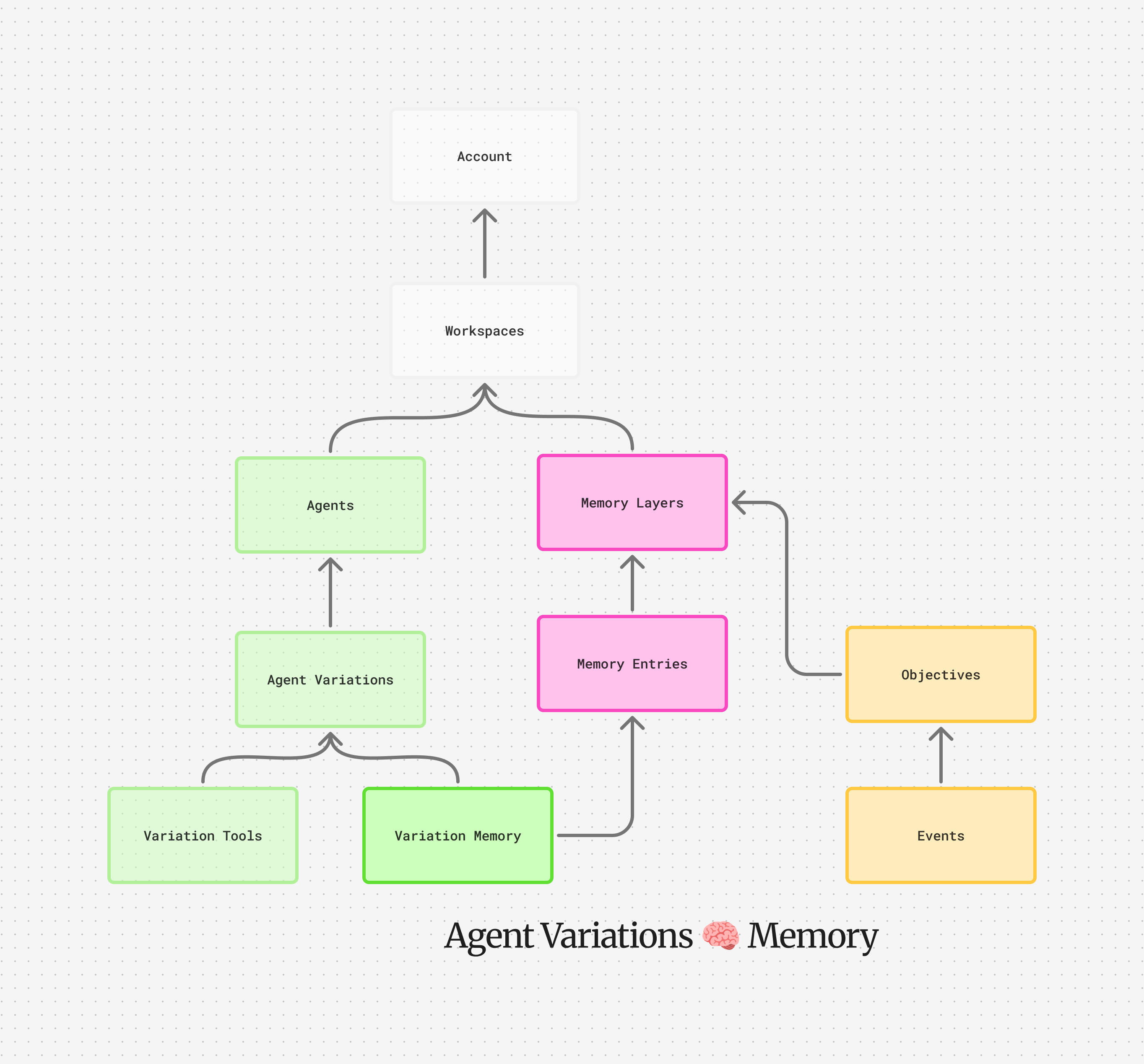 Memory layers aren't only configured on agent variations. You can also layer extra references into the cascade when creating an objective. These objective-level layers are more specific than the variation's baseline, so they win when keys collide. In CSS terms, they are the element-level rules over the inherited styles.
This is done through the `memoryCascade` field on objective creation. Array order is resolution order: earlier elements are more specific. If you want a layer to win over everything else, put it first.
```json theme={null}
{
"firstUserMessage": "Help this VIP customer.",
"systemPromptData": {},
"memoryCascade": [
{ "memoryLayerId": "external_id:high-touch-customer" },
{ "memoryLayerId": "external_id:base-customer" }
]
}
```
Here `high-touch-customer` comes first, so it wins on any key the two layers share.
You can also pin a single entry from a layer by specifying a `memoryEntryId` alongside the `memoryLayerId`. The pin behaves like a single-entry layer at that position: it shadows its own key and nothing else, so the rest of its source layer stays out of the cascade. This is useful when you only need one specific piece of context from a larger layer without pulling in everything.
To see the merged result, read the objective back: it carries a read-only `effectiveMemoryCascade`, the full cascade in resolution order. Index zero is the most specific: the episodic layer when one is attached, then the objective's `memoryCascade` in array order, then the variation's baseline layers by ascending position. You never have to re-derive the cascade by hand.
The total effective cascade (variation layers + objective layers) is capped at
10\. A create call that would push past it is rejected, so keep your cascades lean.
The episodic layer rides free: it does not count against the cap.
## Episodic memory
Skills layers hold knowledge you write. Episodic memory is the knowledge the agent writes for itself: things it learns while working an objective that it wants back the next time it works on the same customer, project, or whatever your key represents.
Turn it on per agent with `enableEpisodicMemory` in the agent's spec. Once enabled, every objective for that agent must carry an episodic key:
```json theme={null}
{
"firstUserMessage": "Help this VIP customer.",
"systemPromptData": {},
"episodicMemory": { "key": "customer/cust-742" }
}
```
Cadenya finds or creates one memory layer per agent and key pair, then attaches it at the most specific end of the cascade. Objectives that share the key share the layer, so what the agent stored during Monday's objective is there for Thursday's. The layer belongs to the agent, not the variation, so every variation reads and writes the same memories and a learning survives a variation swap.
The agent writes with the `store_memory` tool and reads back with the same `get_memory` and `search_memory` tools it uses for every other layer. Because the episodic layer sits at the most specific end of the cascade, a memory the agent stores wins a key clash against every layer you configured. That is the point: what the agent learned about this customer beats the generic playbook.
A few rules:
* Episodic layers are system managed (`systemManaged: true`). You cannot create them, edit them, assign them to a variation, or reference them in `memoryCascade`. A request that tries is rejected. They attach themselves based on the episodic key, and that is the only way in.
* You can read and list them like any other layer. Filter the layer list by `agentId` or by `episodicKeyPrefix`: a prefix like `customer/` matches `customer/cust-742` and every other key in that namespace, like a Redis key scan.
* Set `episodicMemoryTtl` on the agent to put a lifetime on memories, for example `"604800s"` for a week. Each new objective slides the layer's expiry forward by that duration, and each stored entry expires that long after it was written. Leave it unset and memories stay around for good.
* The objective you read back carries `episodicMemory.memoryLayerId`, the layer that was created or reused for its key, so you can inspect what the agent knows.
## Per-customer overrides
Keep a base layer with the prose and procedures every agent shares. When one customer needs a different answer for a key, create a customer-specific layer that reuses that key and pass it in the objective's `memoryCascade` on create. Objective-level layers are more specific than the variation's baseline, so the agent reads the customer's version of that key and the base version of everything else. Give each customer layer an [external ID](/docs/guides/use-your-own-ids) you own, and you look it up by your own customer key: no fork of the base layer, no per-customer agent.
Memory layers aren't only configured on agent variations. You can also layer extra references into the cascade when creating an objective. These objective-level layers are more specific than the variation's baseline, so they win when keys collide. In CSS terms, they are the element-level rules over the inherited styles.
This is done through the `memoryCascade` field on objective creation. Array order is resolution order: earlier elements are more specific. If you want a layer to win over everything else, put it first.
```json theme={null}
{
"firstUserMessage": "Help this VIP customer.",
"systemPromptData": {},
"memoryCascade": [
{ "memoryLayerId": "external_id:high-touch-customer" },
{ "memoryLayerId": "external_id:base-customer" }
]
}
```
Here `high-touch-customer` comes first, so it wins on any key the two layers share.
You can also pin a single entry from a layer by specifying a `memoryEntryId` alongside the `memoryLayerId`. The pin behaves like a single-entry layer at that position: it shadows its own key and nothing else, so the rest of its source layer stays out of the cascade. This is useful when you only need one specific piece of context from a larger layer without pulling in everything.
To see the merged result, read the objective back: it carries a read-only `effectiveMemoryCascade`, the full cascade in resolution order. Index zero is the most specific: the episodic layer when one is attached, then the objective's `memoryCascade` in array order, then the variation's baseline layers by ascending position. You never have to re-derive the cascade by hand.
The total effective cascade (variation layers + objective layers) is capped at
10\. A create call that would push past it is rejected, so keep your cascades lean.
The episodic layer rides free: it does not count against the cap.
## Episodic memory
Skills layers hold knowledge you write. Episodic memory is the knowledge the agent writes for itself: things it learns while working an objective that it wants back the next time it works on the same customer, project, or whatever your key represents.
Turn it on per agent with `enableEpisodicMemory` in the agent's spec. Once enabled, every objective for that agent must carry an episodic key:
```json theme={null}
{
"firstUserMessage": "Help this VIP customer.",
"systemPromptData": {},
"episodicMemory": { "key": "customer/cust-742" }
}
```
Cadenya finds or creates one memory layer per agent and key pair, then attaches it at the most specific end of the cascade. Objectives that share the key share the layer, so what the agent stored during Monday's objective is there for Thursday's. The layer belongs to the agent, not the variation, so every variation reads and writes the same memories and a learning survives a variation swap.
The agent writes with the `store_memory` tool and reads back with the same `get_memory` and `search_memory` tools it uses for every other layer. Because the episodic layer sits at the most specific end of the cascade, a memory the agent stores wins a key clash against every layer you configured. That is the point: what the agent learned about this customer beats the generic playbook.
A few rules:
* Episodic layers are system managed (`systemManaged: true`). You cannot create them, edit them, assign them to a variation, or reference them in `memoryCascade`. A request that tries is rejected. They attach themselves based on the episodic key, and that is the only way in.
* You can read and list them like any other layer. Filter the layer list by `agentId` or by `episodicKeyPrefix`: a prefix like `customer/` matches `customer/cust-742` and every other key in that namespace, like a Redis key scan.
* Set `episodicMemoryTtl` on the agent to put a lifetime on memories, for example `"604800s"` for a week. Each new objective slides the layer's expiry forward by that duration, and each stored entry expires that long after it was written. Leave it unset and memories stay around for good.
* The objective you read back carries `episodicMemory.memoryLayerId`, the layer that was created or reused for its key, so you can inspect what the agent knows.
## Per-customer overrides
Keep a base layer with the prose and procedures every agent shares. When one customer needs a different answer for a key, create a customer-specific layer that reuses that key and pass it in the objective's `memoryCascade` on create. Objective-level layers are more specific than the variation's baseline, so the agent reads the customer's version of that key and the base version of everything else. Give each customer layer an [external ID](/docs/guides/use-your-own-ids) you own, and you look it up by your own customer key: no fork of the base layer, no per-customer agent.