> ## Documentation Index
> Fetch the complete documentation index at: https://cadenya.com/docs/llms.txt
> Use this file to discover all available pages before exploring further.
# Approving a tool
> A hands-on lesson. Receive a tool-approval webhook, route it to the right person using the objective's labels, then approve or deny with the Cadenya SDK.
When a tool needs a human yes, Cadenya pauses the objective and POSTs a webhook to your server. In this lesson you build a handler that verifies the webhook, reads the objective's labels to find who to ask, then uses the Cadenya SDK to approve the call or deny it with a steering memo. Examples come in TypeScript and Go.
```mermaid theme={null}
sequenceDiagram
participant C as Cadenya
participant H as Your handler
participant P as Your reviewer
C->>H: objective_event.tool_approval_requested
H->>P: Notify (Slack, email) using labels
P->>H: Approve or deny
H->>C: SDK approve / deny + memo
C->>C: Agent resumes
```
## What you need
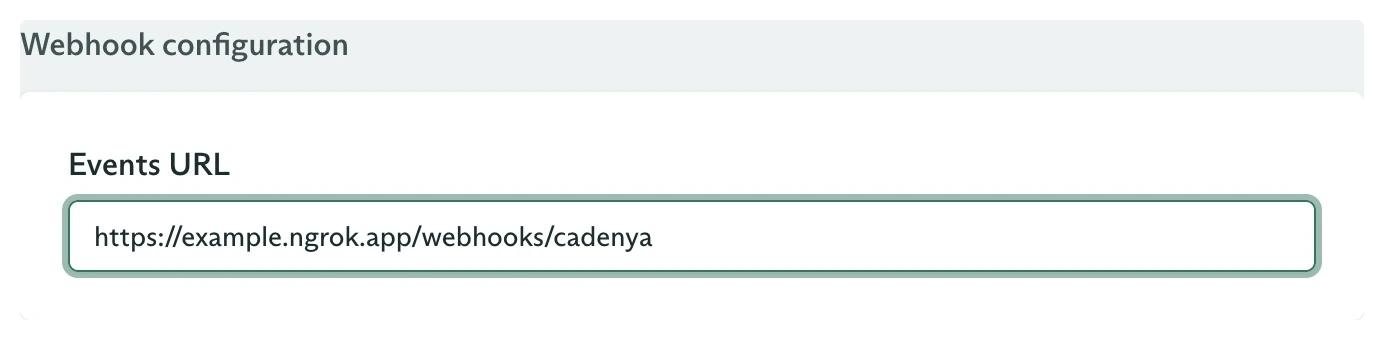
* An agent with a tool that requires approval, and its webhook endpoint pointed at your server. Set the agent's **Events URL** under **Webhook configuration** on its form (the `webhookEventsUrl` field on the agent spec). The [Wrap an HTTP API](/docs/guides/tool-sets/http) lesson builds an approval-gated tool, and [Run your first objective](/docs/guides/run-an-objective) shows the approval pause.
* Your webhook signing secret in `CADENYA_WEBHOOK_KEY`, and your API key in `CADENYA_API_KEY`.
* The SDK for your language, and a public URL to your server (ngrok or a deployed endpoint).
 ```bash TypeScript theme={null}
npm install @cadenya/cadenya
```
```bash Go theme={null}
go get go.cadenya.com/cadenya-go
```
## Step 1: Put routing data in labels
The webhook carries the objective's **labels** and **external ID**, not its custom `data`. So stash whatever you need to route a notification into `labels` when you start the objective. Set the external ID to your own key, such as the support ticket.
```bash theme={null}
curl "https://api.cadenya.com/v1/workspaces/${CADENYA_WORKSPACE_ID}/objectives" \
-H "Authorization: Bearer $CADENYA_API_KEY" \
-H "Content-Type: application/json" \
-d '{
"agentId": "external_id:support",
"metadata": {
"externalId": "ticket-4821",
"labels": { "slack_channel": "C0123ABCD", "notify_user": "U0456WXYZ" }
},
"systemPromptData": {},
"firstUserMessage": "Charge this customer their overdue balance."
}'
```
Labels and the external ID ride in every webhook for the objective. The custom `data` object does not. Mirror the routing keys you need into labels, and fetch the objective by ID later if you need the rest.
## Step 2: Receive and verify the webhook
Your agent's webhook URL gets a POST for every event. Read the raw body and headers, then hand them to `unwrap`. It checks the [Standard Webhooks](https://www.standardwebhooks.com/) signature against your `CADENYA_WEBHOOK_KEY` and parses the payload. A bad signature throws, so a failed verify never reaches your logic.
```ts TypeScript theme={null}
import express from 'express';
import Cadenya, { type Cadenya as CadenyaTypes } from '@cadenya/cadenya';
const cadenya = new Cadenya(); // reads CADENYA_API_KEY and CADENYA_WEBHOOK_KEY
const app = express();
app.post('/webhooks/cadenya', express.raw({ type: 'application/json' }), (req, res) => {
let event;
try {
event = cadenya.webhooks.unwrap(req.body.toString(), { headers: req.headers });
} catch {
res.status(401).send('bad signature');
return;
}
res.status(200).end(); // ack fast, then work
handle(event).catch((err) => console.error({ err }, 'dispatch failed'));
});
```
```go Go theme={null}
package main
import (
"io"
"net/http"
"os"
"go.cadenya.com/cadenya-go"
"go.cadenya.com/cadenya-go/option"
)
func main() {
client := cadenya.NewClient(
option.WithAPIKey(os.Getenv("CADENYA_API_KEY")),
option.WithWebhookKey(os.Getenv("CADENYA_WEBHOOK_KEY")),
)
http.HandleFunc("/webhooks/cadenya", func(w http.ResponseWriter, r *http.Request) {
body, _ := io.ReadAll(r.Body)
event, err := client.Webhooks.Unwrap(body, r.Header)
if err != nil {
http.Error(w, "bad signature", http.StatusUnauthorized)
return
}
w.WriteHeader(http.StatusOK) // ack fast, then work
go handle(client, event)
})
http.ListenAndServe(":3000", nil)
}
```
Testing against synthetic payloads with no tunnel yet? Use `unsafeUnwrap`, which parses without checking the signature. Switch back to `unwrap` before you ship.
## Step 3: Find who to ask
Filter to the approval event, then read the routing keys you stored in Step 1. The tool call ID lives on the event payload, and the objective ID is the handle you approve against.
```ts TypeScript theme={null}
async function handle(event: CadenyaTypes.UnwrapWebhookEvent) {
const data = event.data.objectiveEvent.data;
if (data.type !== 'toolApprovalRequested') return;
const objective = event.data.objective;
const objectiveId = objective.id;
const workspaceId = objective.workspaceId; // needed to act on the call later
const channel = objective.labels?.slack_channel; // who to notify
const ticket = objective.externalId; // your own key
const toolCallId = data.toolApprovalRequested.toolCallId;
await notifyReviewer({ workspaceId, channel, ticket, objectiveId, toolCallId });
}
```
```go Go theme={null}
func handle(client *cadenya.Client, event *cadenya.UnwrapWebhookEvent) {
if event.Type != "objective_event.tool_approval_requested" {
return
}
objective := event.Data.Objective
objectiveID := objective.ID
workspaceID := objective.WorkspaceID // needed to act on the call later
channel := objective.Labels["slack_channel"] // who to notify
ticket := objective.ExternalID // your own key
toolCallID := event.Data.ObjectiveEvent.Data.ToolApprovalRequested.ToolCallID
notifyReviewer(client, workspaceID, channel, ticket, objectiveID, toolCallID)
}
```
The fields you can read off the payload:
The event name, such as `objective_event.tool_approval_requested`. Branch on it to handle each kind of event.
The objective's operation metadata: `id`, `externalId`, `labels`, plus account and workspace IDs. This is your routing source.
The event itself. For an approval, its `data.toolApprovalRequested.toolCallId` is the call you decide on.
Resource metadata for the agent and the variation that produced the event, when you want to log or branch on which agent asked.
## Step 4: Approve, or deny with steering
This call runs from your reviewer-facing action, a Slack button handler or an approval link, not the webhook handler. Persist the `workspaceId`, `objectiveId`, and `toolCallId` from Step 3 with the notification (a button value, a signed link) so the action has them when the click arrives. Then send the decision with the SDK. Approve resumes the call as written. Deny hands the agent a `memo`, which steers it toward a different choice instead of stopping it cold.
```ts TypeScript theme={null}
// Approve
await cadenya.objectives.toolCalls.approve(objectiveId, toolCallId, { workspaceId });
// Deny with steering
await cadenya.objectives.toolCalls.deny(objectiveId, toolCallId, {
workspaceId,
memo: 'Do not charge the full balance. Offer a payment plan instead.',
});
```
```go Go theme={null}
// Approve
_, err := client.Objectives.ToolCalls.Approve(ctx, objectiveID, toolCallID,
cadenya.ObjectiveToolCallApproveParams{
WorkspaceID: cadenya.String(workspaceID),
})
// Deny with steering
_, err = client.Objectives.ToolCalls.Deny(ctx, objectiveID, toolCallID,
cadenya.ObjectiveToolCallDenyParams{
WorkspaceID: cadenya.String(workspaceID),
Memo: cadenya.String("Do not charge the full balance. Offer a payment plan instead."),
})
```
Approve and deny take the workspace ID, the objective ID, and the tool call ID, all of which ride on the webhook. The objective ID also accepts the `external_id:` form, so your ticket number works as the handle too.
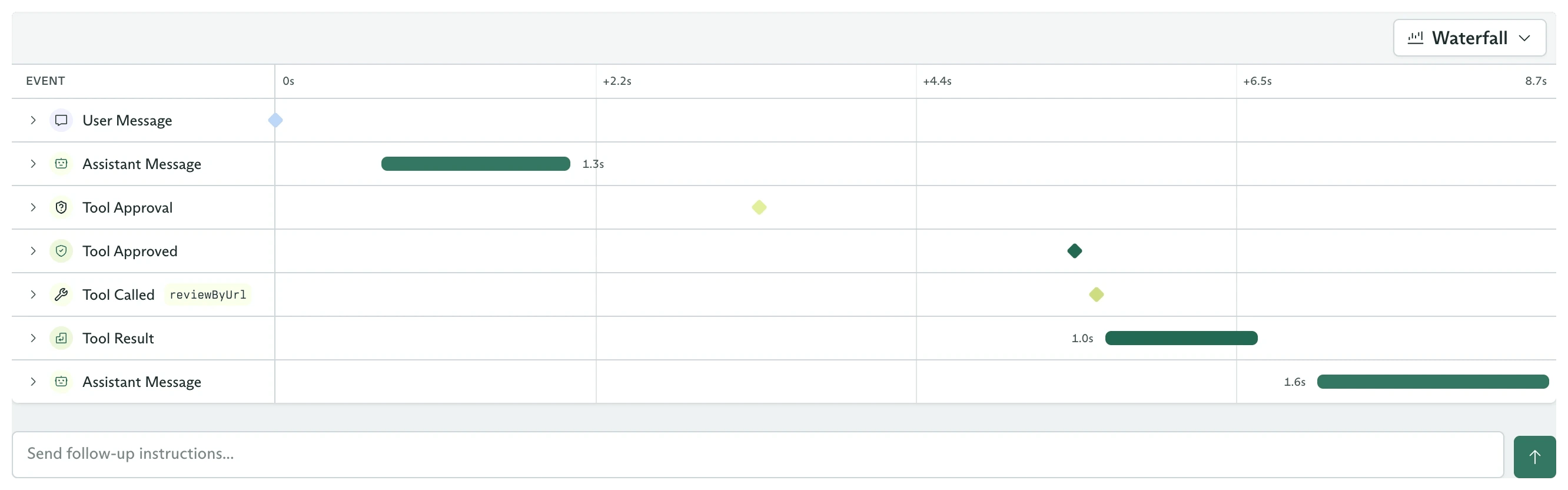
The objective leaves its paused state. On approve, the agent calls the tool and reads the result. On deny, the agent gets the rejected call back as its result, a denial carrying your memo, so it reads your steer for that exact call and picks another path.
```bash TypeScript theme={null}
npm install @cadenya/cadenya
```
```bash Go theme={null}
go get go.cadenya.com/cadenya-go
```
## Step 1: Put routing data in labels
The webhook carries the objective's **labels** and **external ID**, not its custom `data`. So stash whatever you need to route a notification into `labels` when you start the objective. Set the external ID to your own key, such as the support ticket.
```bash theme={null}
curl "https://api.cadenya.com/v1/workspaces/${CADENYA_WORKSPACE_ID}/objectives" \
-H "Authorization: Bearer $CADENYA_API_KEY" \
-H "Content-Type: application/json" \
-d '{
"agentId": "external_id:support",
"metadata": {
"externalId": "ticket-4821",
"labels": { "slack_channel": "C0123ABCD", "notify_user": "U0456WXYZ" }
},
"systemPromptData": {},
"firstUserMessage": "Charge this customer their overdue balance."
}'
```
Labels and the external ID ride in every webhook for the objective. The custom `data` object does not. Mirror the routing keys you need into labels, and fetch the objective by ID later if you need the rest.
## Step 2: Receive and verify the webhook
Your agent's webhook URL gets a POST for every event. Read the raw body and headers, then hand them to `unwrap`. It checks the [Standard Webhooks](https://www.standardwebhooks.com/) signature against your `CADENYA_WEBHOOK_KEY` and parses the payload. A bad signature throws, so a failed verify never reaches your logic.
```ts TypeScript theme={null}
import express from 'express';
import Cadenya, { type Cadenya as CadenyaTypes } from '@cadenya/cadenya';
const cadenya = new Cadenya(); // reads CADENYA_API_KEY and CADENYA_WEBHOOK_KEY
const app = express();
app.post('/webhooks/cadenya', express.raw({ type: 'application/json' }), (req, res) => {
let event;
try {
event = cadenya.webhooks.unwrap(req.body.toString(), { headers: req.headers });
} catch {
res.status(401).send('bad signature');
return;
}
res.status(200).end(); // ack fast, then work
handle(event).catch((err) => console.error({ err }, 'dispatch failed'));
});
```
```go Go theme={null}
package main
import (
"io"
"net/http"
"os"
"go.cadenya.com/cadenya-go"
"go.cadenya.com/cadenya-go/option"
)
func main() {
client := cadenya.NewClient(
option.WithAPIKey(os.Getenv("CADENYA_API_KEY")),
option.WithWebhookKey(os.Getenv("CADENYA_WEBHOOK_KEY")),
)
http.HandleFunc("/webhooks/cadenya", func(w http.ResponseWriter, r *http.Request) {
body, _ := io.ReadAll(r.Body)
event, err := client.Webhooks.Unwrap(body, r.Header)
if err != nil {
http.Error(w, "bad signature", http.StatusUnauthorized)
return
}
w.WriteHeader(http.StatusOK) // ack fast, then work
go handle(client, event)
})
http.ListenAndServe(":3000", nil)
}
```
Testing against synthetic payloads with no tunnel yet? Use `unsafeUnwrap`, which parses without checking the signature. Switch back to `unwrap` before you ship.
## Step 3: Find who to ask
Filter to the approval event, then read the routing keys you stored in Step 1. The tool call ID lives on the event payload, and the objective ID is the handle you approve against.
```ts TypeScript theme={null}
async function handle(event: CadenyaTypes.UnwrapWebhookEvent) {
const data = event.data.objectiveEvent.data;
if (data.type !== 'toolApprovalRequested') return;
const objective = event.data.objective;
const objectiveId = objective.id;
const workspaceId = objective.workspaceId; // needed to act on the call later
const channel = objective.labels?.slack_channel; // who to notify
const ticket = objective.externalId; // your own key
const toolCallId = data.toolApprovalRequested.toolCallId;
await notifyReviewer({ workspaceId, channel, ticket, objectiveId, toolCallId });
}
```
```go Go theme={null}
func handle(client *cadenya.Client, event *cadenya.UnwrapWebhookEvent) {
if event.Type != "objective_event.tool_approval_requested" {
return
}
objective := event.Data.Objective
objectiveID := objective.ID
workspaceID := objective.WorkspaceID // needed to act on the call later
channel := objective.Labels["slack_channel"] // who to notify
ticket := objective.ExternalID // your own key
toolCallID := event.Data.ObjectiveEvent.Data.ToolApprovalRequested.ToolCallID
notifyReviewer(client, workspaceID, channel, ticket, objectiveID, toolCallID)
}
```
The fields you can read off the payload:
The event name, such as `objective_event.tool_approval_requested`. Branch on it to handle each kind of event.
The objective's operation metadata: `id`, `externalId`, `labels`, plus account and workspace IDs. This is your routing source.
The event itself. For an approval, its `data.toolApprovalRequested.toolCallId` is the call you decide on.
Resource metadata for the agent and the variation that produced the event, when you want to log or branch on which agent asked.
## Step 4: Approve, or deny with steering
This call runs from your reviewer-facing action, a Slack button handler or an approval link, not the webhook handler. Persist the `workspaceId`, `objectiveId`, and `toolCallId` from Step 3 with the notification (a button value, a signed link) so the action has them when the click arrives. Then send the decision with the SDK. Approve resumes the call as written. Deny hands the agent a `memo`, which steers it toward a different choice instead of stopping it cold.
```ts TypeScript theme={null}
// Approve
await cadenya.objectives.toolCalls.approve(objectiveId, toolCallId, { workspaceId });
// Deny with steering
await cadenya.objectives.toolCalls.deny(objectiveId, toolCallId, {
workspaceId,
memo: 'Do not charge the full balance. Offer a payment plan instead.',
});
```
```go Go theme={null}
// Approve
_, err := client.Objectives.ToolCalls.Approve(ctx, objectiveID, toolCallID,
cadenya.ObjectiveToolCallApproveParams{
WorkspaceID: cadenya.String(workspaceID),
})
// Deny with steering
_, err = client.Objectives.ToolCalls.Deny(ctx, objectiveID, toolCallID,
cadenya.ObjectiveToolCallDenyParams{
WorkspaceID: cadenya.String(workspaceID),
Memo: cadenya.String("Do not charge the full balance. Offer a payment plan instead."),
})
```
Approve and deny take the workspace ID, the objective ID, and the tool call ID, all of which ride on the webhook. The objective ID also accepts the `external_id:` form, so your ticket number works as the handle too.
The objective leaves its paused state. On approve, the agent calls the tool and reads the result. On deny, the agent gets the rejected call back as its result, a denial carrying your memo, so it reads your steer for that exact call and picks another path.
 A pending approval waits up to 24 hours. If no one approves or denies it in that window, the call times out and fails (it is not auto-approved or auto-denied), and the objective surfaces an error. Notify your reviewer promptly, and handle the timeout the same way you handle any failed run.
## What you built
You stood up a handler that verifies a Cadenya webhook and routes the approval to a reviewer using labels you set at create time, plus a decision action that answers with the SDK. Swap `notifyReviewer` for a Slack post or an email and you have a working approval loop.
## Going further
Every event type that can reach your handler, and the objective lifecycle behind them.
Where approvals fit in the full objective arc: data, secrets, and structured output.
The same handler, reacting to finish and failure events instead of approvals.
A pending approval waits up to 24 hours. If no one approves or denies it in that window, the call times out and fails (it is not auto-approved or auto-denied), and the objective surfaces an error. Notify your reviewer promptly, and handle the timeout the same way you handle any failed run.
## What you built
You stood up a handler that verifies a Cadenya webhook and routes the approval to a reviewer using labels you set at create time, plus a decision action that answers with the SDK. Swap `notifyReviewer` for a Slack post or an email and you have a working approval loop.
## Going further
Every event type that can reach your handler, and the objective lifecycle behind them.
Where approvals fit in the full objective arc: data, secrets, and structured output.
The same handler, reacting to finish and failure events instead of approvals.