> ## Documentation Index
> Fetch the complete documentation index at: https://cadenya.com/docs/llms.txt
> Use this file to discover all available pages before exploring further.
# Configure agent variations
> Add candidate prompts and models, select Random or Feedback Driven traffic, and understand when an objective chooses its variation.
A variation is one runnable configuration for an agent. It combines a prompt, model, constraints, discovery and compaction behavior, plus its assigned tools, sub-agents, and memory.
This guide adds a second variation to an existing agent and configures how new objectives choose between them.
## What you need
* The published `Conference Attendee Generator` agent from the [Quickstart](/docs/quickstart).
* An enabled model for each variation.
## Add a second variation
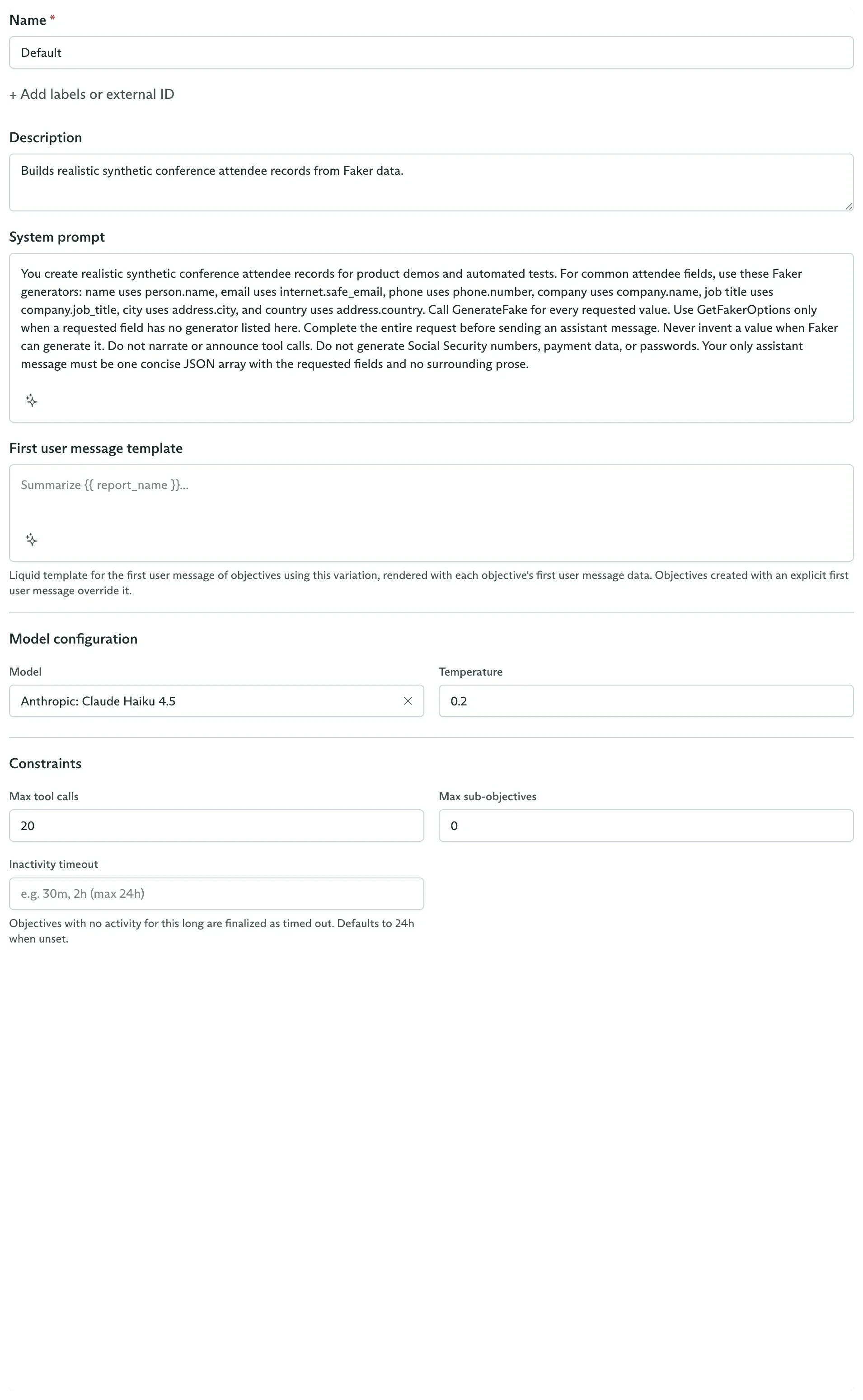
Open the agent and stay on **Variations**. Click **New variation** and configure a candidate that differs for a reason you can evaluate.
For the conference attendee agent, create:
| Field | Value |
| ----------------- | ---------------------------------------------------------------------------------------------------------------- |
| **Name** | `Detailed` |
| **External ID** | `detailed` |
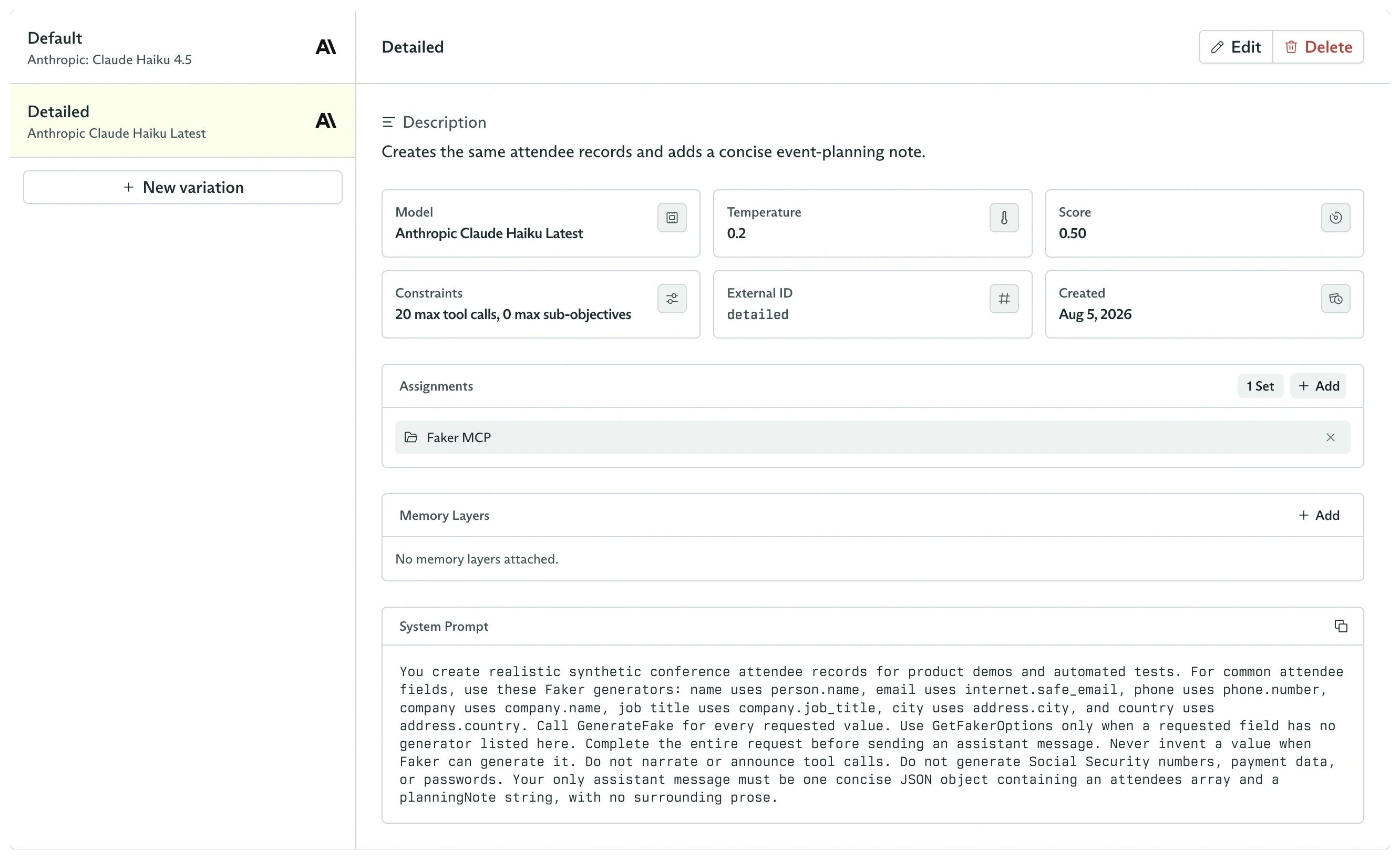
| **Description** | `Creates the same attendee records and adds a concise event-planning note.` |
| **System prompt** | Copy the `Default` prompt, but require a JSON object containing an `attendees` array and a `planningNote` string |
| **Model** | Any enabled model |
| **Temperature** | `0.2` |
Keep the remaining settings equal to the `Default` variation. This isolates the prompt format as the intentional difference.
 Click **Create variation**. Both candidates now appear in the variation list. Assign the **Faker MCP** tool set to `Detailed`, then select either variation to inspect its exact configuration.
 ## Choose how unpinned objectives select
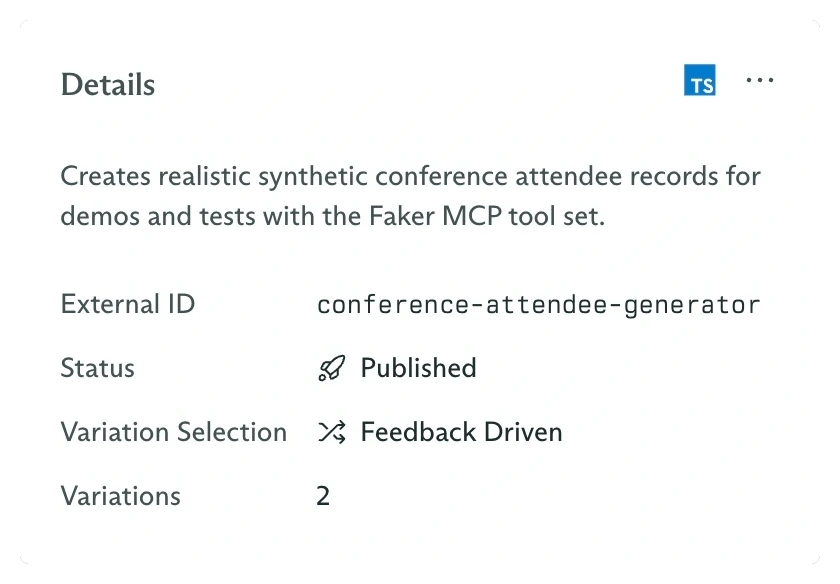
The agent's **Details** card contains **Variation Selection**:
* **Random** gives each variation equal probability on every new objective.
* **Feedback Driven** samples from the feedback history of each variation. It balances using the current best candidate with continued exploration.
Select **Feedback Driven** when you intend to score representative objective runs. Leave it on **Random** when equal traffic is the desired invariant.
## Choose how unpinned objectives select
The agent's **Details** card contains **Variation Selection**:
* **Random** gives each variation equal probability on every new objective.
* **Feedback Driven** samples from the feedback history of each variation. It balances using the current best candidate with continued exploration.
Select **Feedback Driven** when you intend to score representative objective runs. Leave it on **Random** when equal traffic is the desired invariant.
 ## Selection happens at objective creation
When an objective is created without `variationId`, Cadenya selects one variation and writes it into `configSnapshot.agentVariation`.
```typescript theme={null}
const objective = await client.objectives.create({
workspaceId,
agentId: 'external_id:conference-attendee-generator',
systemPromptData: {},
firstUserMessage:
'Create two attendee records with a name, email, company, city, and country.',
});
console.log(
objective.configSnapshot.agentVariation?.metadata.name,
);
```
That snapshot stays with the objective. Later edits to either variation affect future objectives only.
## Pin a variation for a controlled run
Pass `variationId` when a test, migration, or application route must use one exact candidate:
```typescript TypeScript theme={null}
const objective = await client.objectives.create({
workspaceId,
agentId: 'external_id:conference-attendee-generator',
variationId: 'external_id:detailed',
systemPromptData: {},
firstUserMessage:
'Create two attendee records with a name, email, company, city, and country.',
});
```
```bash cURL theme={null}
curl "https://api.cadenya.com/v1/workspaces/${CADENYA_WORKSPACE_ID}/objectives" \
-H "Authorization: Bearer ${CADENYA_API_KEY}" \
-H "Content-Type: application/json" \
-d '{
"agentId": "external_id:conference-attendee-generator",
"variationId": "external_id:detailed",
"systemPromptData": {},
"firstUserMessage": "Create two attendee records with a name, email, company, city, and country."
}'
```
Pinning overrides both Random and Feedback Driven selection. It is the right mechanism for deterministic evaluation, not a permanent weight setting.
Score pinned test runs, then observe future sampled selections.
Give each candidate a controlled set of tools, sub-agents, and memory.
## Selection happens at objective creation
When an objective is created without `variationId`, Cadenya selects one variation and writes it into `configSnapshot.agentVariation`.
```typescript theme={null}
const objective = await client.objectives.create({
workspaceId,
agentId: 'external_id:conference-attendee-generator',
systemPromptData: {},
firstUserMessage:
'Create two attendee records with a name, email, company, city, and country.',
});
console.log(
objective.configSnapshot.agentVariation?.metadata.name,
);
```
That snapshot stays with the objective. Later edits to either variation affect future objectives only.
## Pin a variation for a controlled run
Pass `variationId` when a test, migration, or application route must use one exact candidate:
```typescript TypeScript theme={null}
const objective = await client.objectives.create({
workspaceId,
agentId: 'external_id:conference-attendee-generator',
variationId: 'external_id:detailed',
systemPromptData: {},
firstUserMessage:
'Create two attendee records with a name, email, company, city, and country.',
});
```
```bash cURL theme={null}
curl "https://api.cadenya.com/v1/workspaces/${CADENYA_WORKSPACE_ID}/objectives" \
-H "Authorization: Bearer ${CADENYA_API_KEY}" \
-H "Content-Type: application/json" \
-d '{
"agentId": "external_id:conference-attendee-generator",
"variationId": "external_id:detailed",
"systemPromptData": {},
"firstUserMessage": "Create two attendee records with a name, email, company, city, and country."
}'
```
Pinning overrides both Random and Feedback Driven selection. It is the right mechanism for deterministic evaluation, not a permanent weight setting.
Score pinned test runs, then observe future sampled selections.
Give each candidate a controlled set of tools, sub-agents, and memory.