> ## Documentation Index
> Fetch the complete documentation index at: https://cadenya.com/docs/llms.txt
> Use this file to discover all available pages before exploring further.
# Optimize variations with objective feedback
> Score objective runs, update each variation's Thompson Sampling posterior, and influence variation selection on future objectives.
**Feedback Driven** variation selection turns objective ratings into evidence for future traffic. The selected variation is snapshotted when each objective is created. Feedback on that objective updates the variation's sampling parameters for objectives created later.
```mermaid theme={null}
---
config:
themeCSS: |
.actor {
fill: #347763 !important;
stroke: #165B41 !important;
}
text.actor, text.actor-box,
text.actor tspan, text.actor-box tspan {
fill: #FFFFFF !important;
}
.actor-line {
stroke: #739486 !important;
}
---
sequenceDiagram
participant App as Your application
participant C as Cadenya
participant V as Selected variation
App->>C: Create objective without variationId
C->>C: Sample each variation and choose one
C->>V: Snapshot configuration and run
V-->>App: Result
App->>C: Submit score from -1.0 to 1.0
C->>C: Update that variation's Beta posterior
App->>C: Create the next objective
C->>C: Draw fresh samples using the new evidence
```
## What feedback changes
Each variation starts at `Beta(1, 1)`, a uniform prior with a posterior mean of `0.5`.
| Score | Posterior update | Direction |
| ---------------- | ------------------------------------ | ------------------------------------------------------------- |
| Greater than `0` | Add the score to alpha | More positive evidence |
| Less than `0` | Add the absolute score to beta | More negative evidence |
| Exactly `0` | Add `0.5` to alpha and `0.5` to beta | Neutral evidence that pulls an extreme posterior toward `0.5` |
On every unpinned objective, Cadenya draws one sample from each variation's Beta posterior and selects the highest. Strong candidates run more often, while uncertain candidates retain a chance to be explored.
The dashboard label is **Feedback Driven**. The API enum remains `VARIATION_SELECTION_MODE_WEIGHTED` for compatibility.
 ## Create controlled evaluation runs
Open **Objectives**, click **New Objective**, select the agent, and optionally choose a specific **Variation**. The variation field overrides automatic selection and is useful when you need comparable samples from every candidate.
Create one run pinned to `Default` and another pinned to `Detailed`, using the same message:
```text theme={null}
Create two attendee records with a name, email, company, city, and country.
```
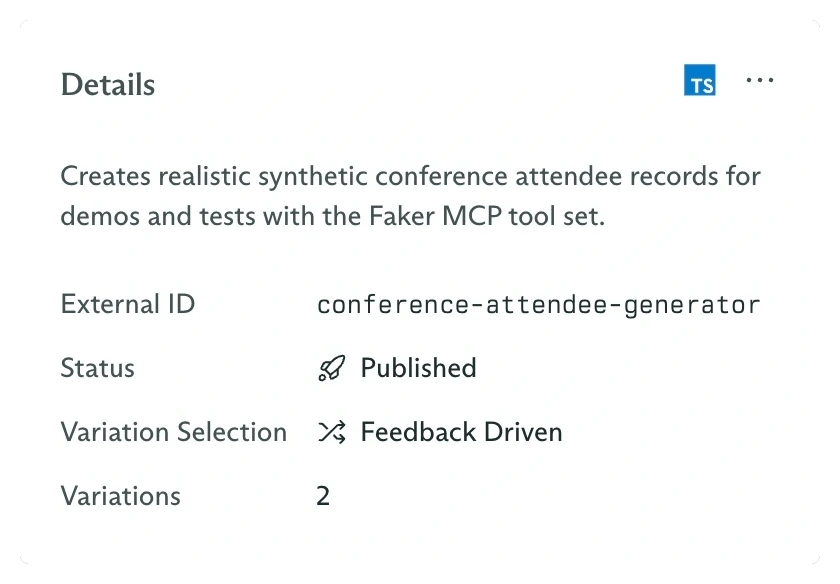
Open each completed objective and confirm the **Variation** value in its Details card. That value comes from the objective's immutable configuration snapshot.
## Submit feedback in the dashboard
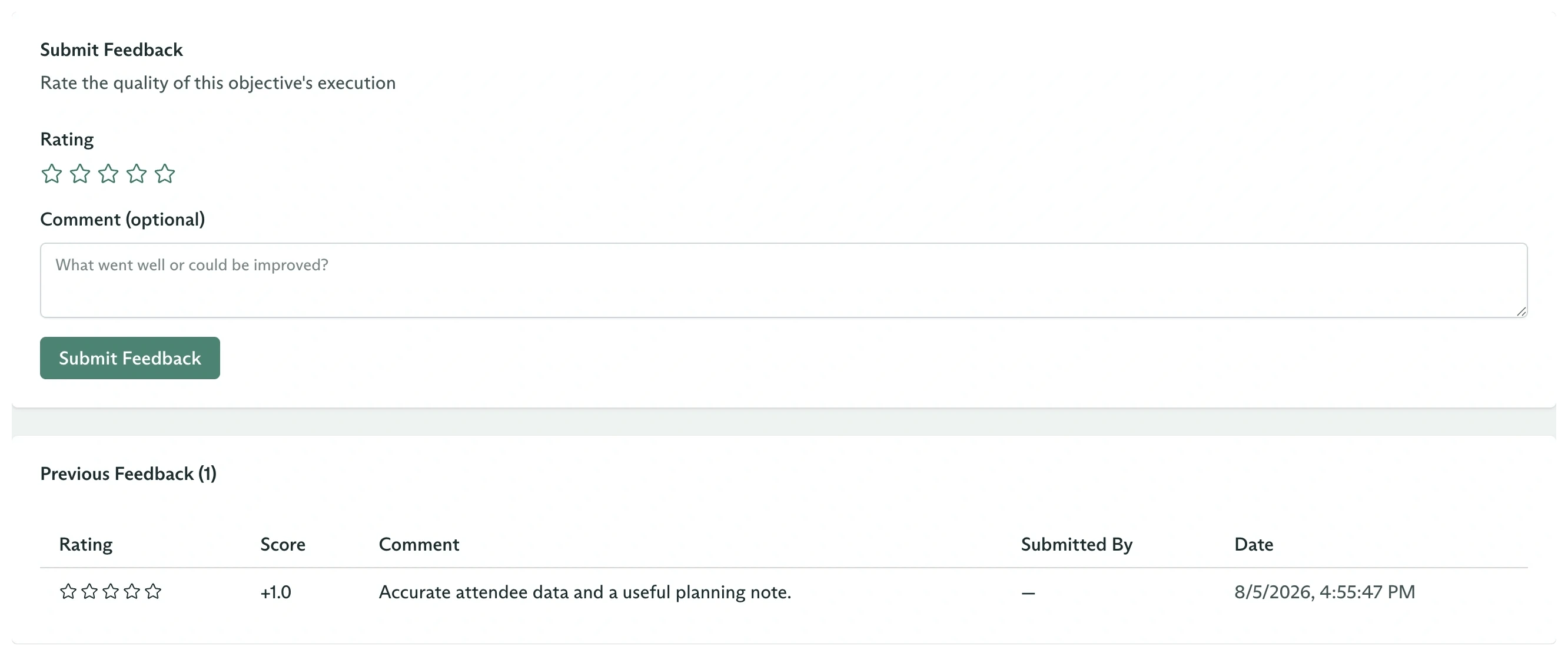
Open an objective and select its **Feedback** tab. Under **Submit Feedback**, choose a rating and optionally explain the decision.
| Stars | API score |
| -------------- | --------- |
| 1, `Very poor` | `-1.0` |
| 2, `Poor` | `-0.5` |
| 3, `Neutral` | `0.0` |
| 4, `Good` | `0.5` |
| 5, `Excellent` | `1.0` |
Click **Submit Feedback**. The entry appears under **Previous Feedback** and is also visible on the agent's **Feedback** tab.
## Create controlled evaluation runs
Open **Objectives**, click **New Objective**, select the agent, and optionally choose a specific **Variation**. The variation field overrides automatic selection and is useful when you need comparable samples from every candidate.
Create one run pinned to `Default` and another pinned to `Detailed`, using the same message:
```text theme={null}
Create two attendee records with a name, email, company, city, and country.
```
Open each completed objective and confirm the **Variation** value in its Details card. That value comes from the objective's immutable configuration snapshot.
## Submit feedback in the dashboard
Open an objective and select its **Feedback** tab. Under **Submit Feedback**, choose a rating and optionally explain the decision.
| Stars | API score |
| -------------- | --------- |
| 1, `Very poor` | `-1.0` |
| 2, `Poor` | `-0.5` |
| 3, `Neutral` | `0.0` |
| 4, `Good` | `0.5` |
| 5, `Excellent` | `1.0` |
Click **Submit Feedback**. The entry appears under **Previous Feedback** and is also visible on the agent's **Feedback** tab.
 ## Submit feedback from code
```typescript TypeScript theme={null}
const feedback = await client.objectives.feedback.create(objectiveId, {
workspaceId,
metadata: {
labels: { evaluator: 'docs-example' },
},
data: {
score: 1,
comment: 'Accurate, concise, and included a useful example.',
},
});
console.log(feedback.metadata.id);
```
```bash cURL theme={null}
curl "https://api.cadenya.com/v1/workspaces/${CADENYA_WORKSPACE_ID}/objectives/${OBJECTIVE_ID}/feedback" \
-H "Authorization: Bearer ${CADENYA_API_KEY}" \
-H "Content-Type: application/json" \
-d '{
"metadata": {
"labels": { "evaluator": "docs-example" }
},
"data": {
"score": 1,
"comment": "Accurate, concise, and included a useful example."
}
}'
```
Feedback appends. Multiple reviewers can submit separate records for the same objective, and every record contributes evidence to the variation that ran it.
## Inspect the updated variation
Retrieve a variation with info to see its current posterior mean and feedback count:
```typescript theme={null}
const variation = await client.agents.variations.retrieve(
agentId,
variationId,
{ workspaceId },
);
console.log({
score: variation.info?.score,
feedbackCount: variation.info?.feedbackCount,
});
```
`info.score` is the posterior mean on a `0` to `1` scale. It is not the average of the original `-1` to `1` feedback values.
## Verify a future sampled selection
Create another objective without `variationId` and inspect the snapshot:
```typescript theme={null}
const sampled = await client.objectives.create({
workspaceId,
agentId,
systemPromptData: {},
firstUserMessage:
'Create one attendee record with a name, email, company, city, and country.',
});
console.log(sampled.configSnapshot.agentVariation?.metadata.name);
```
One run does not prove a probability distribution. Use the agent's **Analytics** tab or a representative batch of objectives to compare selection counts and outcomes over time.
Do not use production feedback to force a deterministic route. Thompson Sampling always preserves exploration. Pass `variationId` when the caller must choose exactly one variation.
## Submit feedback from code
```typescript TypeScript theme={null}
const feedback = await client.objectives.feedback.create(objectiveId, {
workspaceId,
metadata: {
labels: { evaluator: 'docs-example' },
},
data: {
score: 1,
comment: 'Accurate, concise, and included a useful example.',
},
});
console.log(feedback.metadata.id);
```
```bash cURL theme={null}
curl "https://api.cadenya.com/v1/workspaces/${CADENYA_WORKSPACE_ID}/objectives/${OBJECTIVE_ID}/feedback" \
-H "Authorization: Bearer ${CADENYA_API_KEY}" \
-H "Content-Type: application/json" \
-d '{
"metadata": {
"labels": { "evaluator": "docs-example" }
},
"data": {
"score": 1,
"comment": "Accurate, concise, and included a useful example."
}
}'
```
Feedback appends. Multiple reviewers can submit separate records for the same objective, and every record contributes evidence to the variation that ran it.
## Inspect the updated variation
Retrieve a variation with info to see its current posterior mean and feedback count:
```typescript theme={null}
const variation = await client.agents.variations.retrieve(
agentId,
variationId,
{ workspaceId },
);
console.log({
score: variation.info?.score,
feedbackCount: variation.info?.feedbackCount,
});
```
`info.score` is the posterior mean on a `0` to `1` scale. It is not the average of the original `-1` to `1` feedback values.
## Verify a future sampled selection
Create another objective without `variationId` and inspect the snapshot:
```typescript theme={null}
const sampled = await client.objectives.create({
workspaceId,
agentId,
systemPromptData: {},
firstUserMessage:
'Create one attendee record with a name, email, company, city, and country.',
});
console.log(sampled.configSnapshot.agentVariation?.metadata.name);
```
One run does not prove a probability distribution. Use the agent's **Analytics** tab or a representative batch of objectives to compare selection counts and outcomes over time.
Do not use production feedback to force a deterministic route. Thompson Sampling always preserves exploration. Pass `variationId` when the caller must choose exactly one variation.